

Open Circles · Admins
Lane requests and the ladder
Updated 20 Nov 2026
This guide helps admins answer guests who ask to help keep a house's lane, and set the numbers of the My journey ladder.
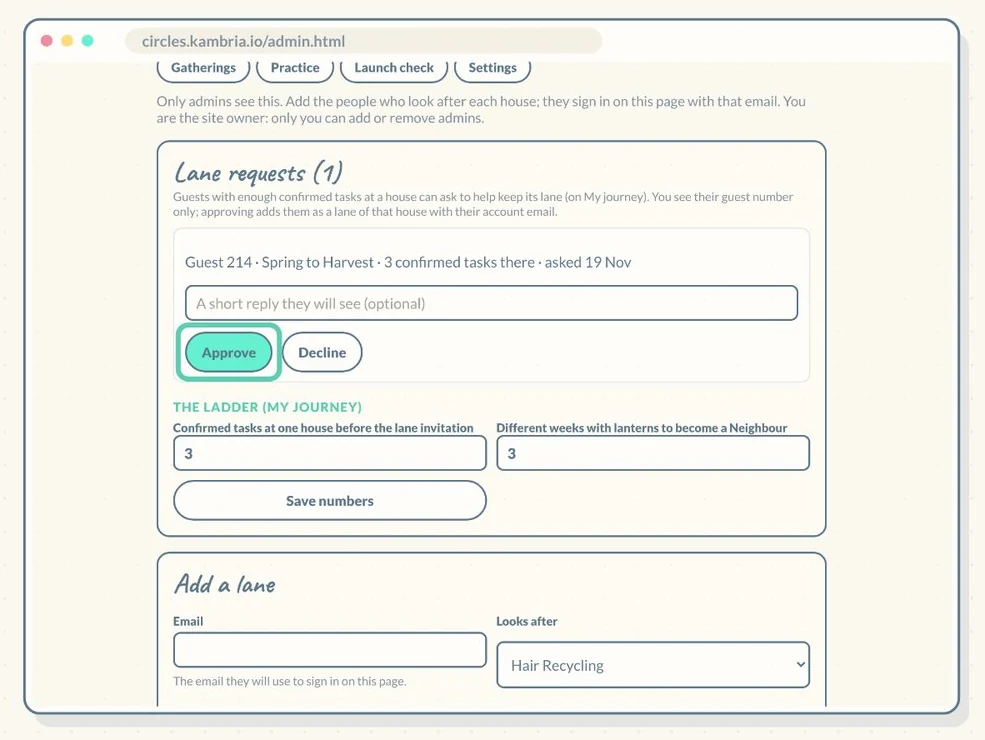
Steps
- Open Lanes. At the top, Lane requests (…) lists the requests, for example Guest 214 · Hair Recycling · 3 confirmed tasks there · asked 12 Dec.
- Write a short reply in the box (optional). The guest sees it on My journey.
- To accept, tap Approve and confirm ("Make Guest 214 a lane of …? Their email will show in the lane list."). The person is added as a lane of that house with their account email.
- To say no, tap Decline. The guest sees Not this time with your reply and can ask again later.
- Under The ladder (My journey), set Confirmed tasks at one house before the lane invitation (1–20, default 3).
- Set Different weeks with lanterns to become a Neighbour (2–12, default 3).
- Tap Save numbers. You see Saved ✓.
Good to know
- Guests see the invitation on My journey only after enough confirmed tasks at one house, and they can only ask after they keep their lanterns with an email and tick that their email will be shown to admins and the house's other lanes.
- In the request you only see the guest number. After you approve, the email shows in the lane list.
- After approval, the new lane sees a Your lanes card on My journey with Open the lane desk. It's still kind to send them the Lane guide.
- Guests can withdraw a request before you decide. If they turned on "Lane keeping" emails, they get an email when you decide.
- When no one is waiting you see No requests right now.
If something goes wrong
- Use 1–20 tasks and 2–12 weeks.
- Something went wrong. Please try again. Reload the Lanes section; the request may already be decided or withdrawn.