

Open Circles · Admins
Moderate thanks on the street
Updated 20 Nov 2026
This guide helps admins check the thank-yous on the street and hide or remove one that isn't right.
Steps
- Open Thanks in the Lane desk.
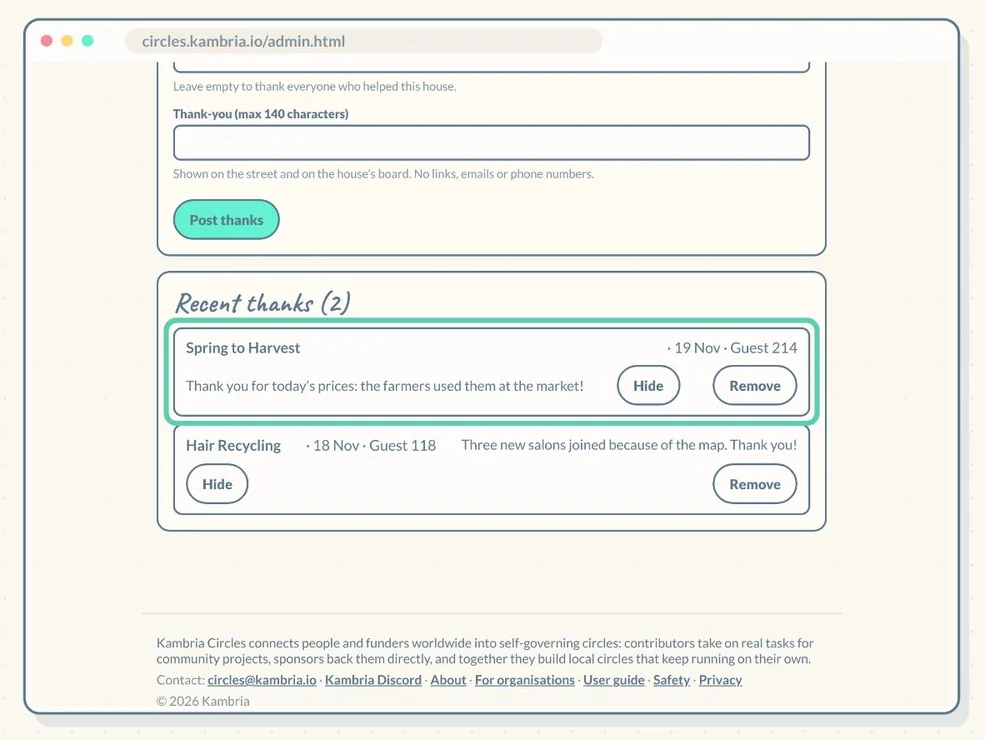
- Read Recent thanks (…): the 40 newest, each with the house, the date, the guest number (if any) and the text. Hidden ones show · hidden.
- To take a thank-you off the street but keep it, tap Hide. Tap Show again to bring it back.
- To delete it, tap Remove and confirm "Remove this thank-you?".
- To post a thank-you for any house, use Say thanks on the street at the top: choose the House, an optional To guest number, the text, and tap Post thanks.
Good to know
- Thanks are public and never show who wrote them.
- The site already blocks links, emails and phone numbers (7 or more digits), and texts shorter than 3 or longer than 140 characters.
- A hidden thank-you disappears from the street, the house's board and the impact report.
- Lanes can only post for their own houses and remove the ones they wrote. Only admins can hide.
- To hide a project's product, open Houses & tasks, find the house under Buy from this project, tick Hidden from the site and tap Save product. Only admins can hide or show a product; lanes add, change and remove them.
If something goes wrong
- Couldn’t change it. Please try again. / Couldn’t remove it. Please try again.
- Thanks can’t be loaded right now. Reload the page; if it keeps happening, tell the site owner.