

Open Circles · Lanes (project leads)
Say thanks on the street
Updated 20 Nov 2026
This guide helps lanes post a short public thank-you that floats over the street and stays on their house's board.
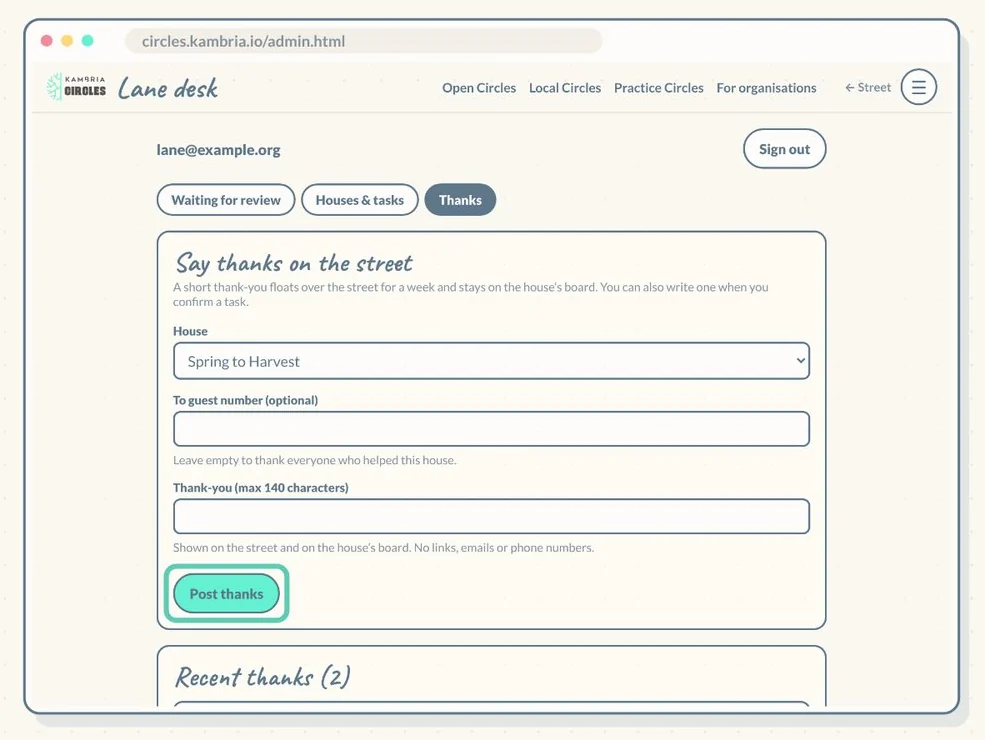
Steps
- While confirming: in Waiting for review, write a few words in Say thanks on the street (optional), for example "Thank you Guest 214 for the price list!", then tap Confirm. The card adds Your thanks is on the street.
- Any time: open the Thanks section of the Lane desk.
- Under Say thanks on the street, choose the House.
- In To guest number (optional), type a guest number, or leave it empty to thank everyone who helped this house.
- Write your Thank-you (max 140 characters) and tap Post thanks. You see Posted ✓.
- Check Recent thanks (…). Tap Remove on a thank-you you wrote to take it down.
- Open the street: your thanks floats up as a paper lantern. Open your house to see it under Thanks from the team.
Good to know
- Thanks are public: everyone sees them, with the guest number if you wrote one. They never show who wrote them.
- A thank-you floats over the street for a week (the 3 newest across all houses), stays on the house's board (the 3 newest), and appears on the house's impact report.
- 3 to 140 characters. No links, emails or phone numbers.
- An admin can hide a thank-you that isn't right.
If something goes wrong
- Write a few words of thanks. / Please keep it to 140 characters.
- No links, emails or phone numbers in a thank-you, please. When this happens while confirming, the task is not confirmed yet: fix the text and tap Confirm again.
- The guest number is 1 to 999 (or leave it empty).
- Confirmed, but the thank-you wasn’t posted: … The lantern is up; post the thanks again from the Thanks section.
- Couldn’t post the thank-you. Please try again. / Only an admin or the person who wrote it can remove it.