

Practice Circles · Practice Circles · Facilitators
Facilitator sign-in and My villages
Updated 20 Nov 2026
This guide helps facilitators sign in, find their villages and add each village's Discord link.
Before you start
- An admin has added your email as a facilitator.
Steps
- Open the lane desk.
- Type the email the admin added under Your email and tap Send me a sign-in link.
- Open the email and tap the link. The lane desk opens.
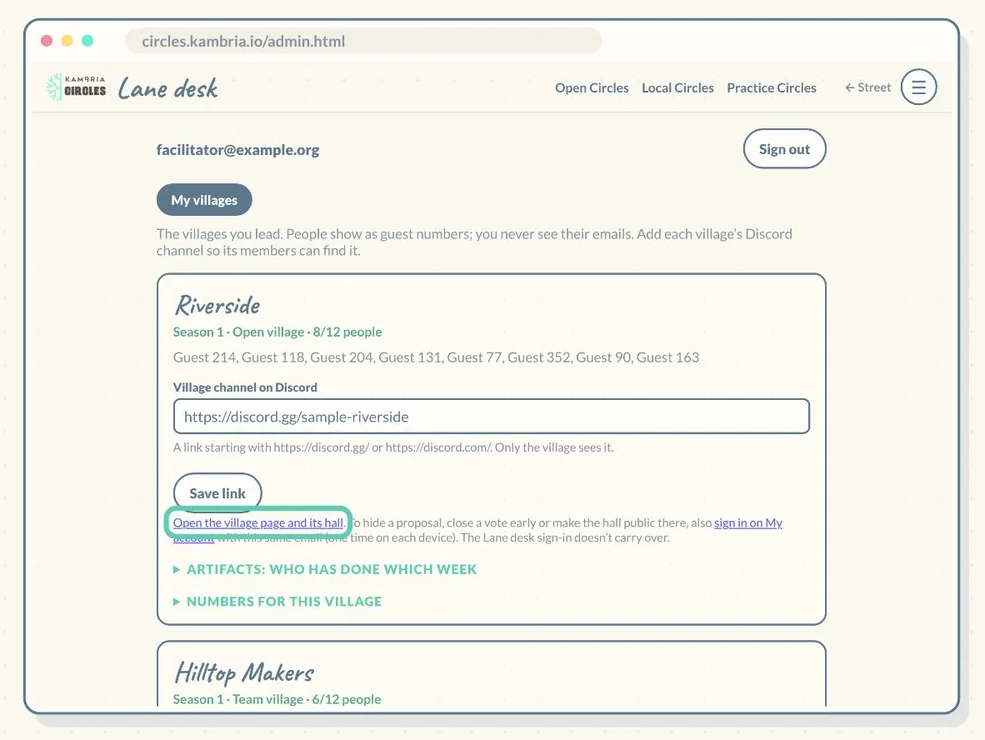
- Tap My villages. Each village shows the season, Open or Team village, the number of people out of 12 and their guest numbers.
- Paste the village's Discord channel link in Village channel on Discord and tap Save link. You see "Saved ✓". To remove it, empty the box and tap Save link ("Removed ✓").
- Tap Open the village page and its hall to see the village as its members do.
- To act in the hall (close a vote, hide or unhide something, make the hall public), also sign in on My account with this same email, one time on each device. The Lane desk sign-in doesn’t carry over. Tap sign in on My account under the village link: My account shows only a facilitator sign-in ("Facilitators: enter the email you use on the Lane desk…"). Tap Send me a sign-in link, open the email and tap the link: you come back to the village page (see "Moderate the village hall").
Good to know
- The sign-in page says "Lanes and Practice facilitators only…": facilitators use the same page as lanes.
- You see guest numbers, never emails.
- The Discord link must start with https://discord.gg/ or https://discord.com/. Only the village's members, you and the admins see it. Members find it on their season page under Open the village channel on Discord.
- A village with fewer than 4 people shows "needs at least 4: ask an admin to match people". Only admins move people.
- Lanes are fixed after week 1: nobody can change a learner’s lane then. Once the season has started, learners who need another village tell you: ask the Practice team (admins), who can move them.
- All talk with your village happens on Discord. The website has no chat.
- An organisation's village also shows Organisation · with its ownership report link and a note for the report (see "Write the note for the ownership report").
If something goes wrong
- "This email isn’t on the list of lanes or facilitators. Ask an admin to add it." Check you typed the email the admin added.
- "That sign-in link didn’t work (it may have expired). Please ask for a new one."
- "Too many sign-in emails were sent. Please wait a few minutes and try again."
- "Use a Discord link (https://discord.gg/… or https://discord.com/…)."
- "No villages yet. An admin chooses a facilitator for each village."
- "Your villages can’t be loaded right now. Please try again later."