

Local Circles · Local · Ring contacts
Confirm newcomers in your ring
Updated 20 Nov 2026
This guide helps ring contacts confirm or decline people who asked to join their ring.
Before you start
- You are signed in with the email account that is the ring’s contact.
Steps
- Open the real challenge page (the link with ?c=…).
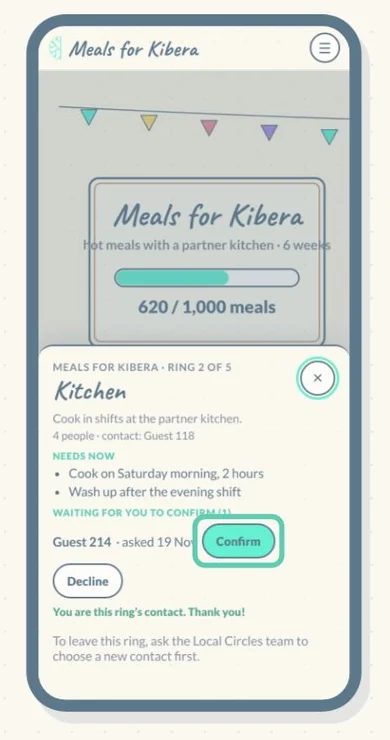
- Tap the stall of your ring. The panel says "You are this ring’s contact. Thank you!"
- If people are waiting, you see Waiting for you to confirm (2), with each person’s guest number and the day they asked (for example "Guest 214 · asked 3 Dec").
- To accept someone, tap Confirm. The ring’s number of people goes up and the person sees "You’re in this ring. Thank you!"
- To say no, tap Decline and then OK on Decline Guest 214? The request is removed.
Good to know
- Only the ring’s contact and admins see who is waiting. Everyone else sees only the number of people in the ring.
- You see guest numbers only, never names or emails.
- Everyone who asks to join has an email account and ticked "18 or older".
- Talk to newcomers about meeting only in public places. Never ask anyone for money or personal details.
- An admin can also confirm or remove people from the admin page.
If something goes wrong
- "Only this ring’s contact or an admin can do this." You are not this ring’s contact, or you are signed in with another account. Sign in with the contact’s email on My account.
- "This request is gone." The person cancelled. Reload the page.
- "You seem to be offline. Please try again when you’re back online."