

Open Circles · Admins
Numbers and CSV download
Updated 20 Nov 2026
This guide helps admins read the Open Circles numbers and download them as a file.
Steps
- Open Numbers in the Lane desk.
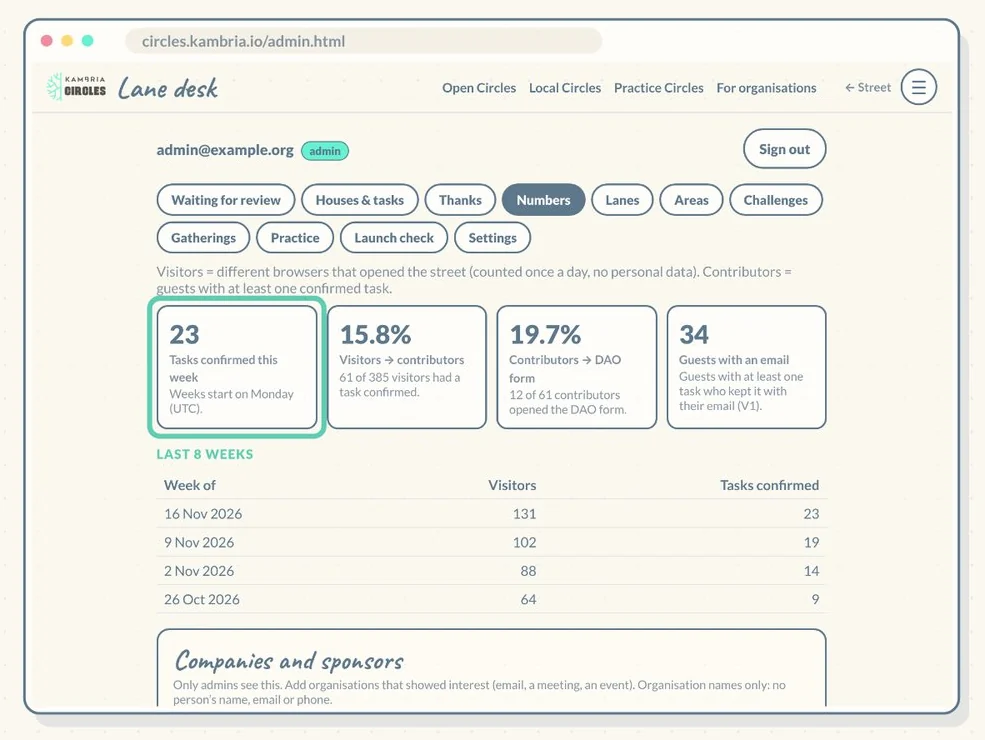
- Read the top boxes: Tasks confirmed this week, Visitors → contributors, Contributors → DAO form, Guests with an email and Practice: want Season 1.
- Under Last 8 weeks, read visitors and confirmed tasks per week.
- Under Coming back, see how many people were active each week and came back the week after. (this week) marks the current week.
- Under The ladder, see how many people reached each step of My journey, from Visitor to DAO applicant.
- Under Houses, see each house: Confirmed (4 weeks), Confirmed (all), Contributors and Lanes.
- Under Companies and sponsors, add organisations that showed interest: Organisation, Kind (Company, Sponsor, Other), Stage (Interested, Talking, Agreed), Date, Note (optional), then Add organisation. You also see report views and the For organisations page views and button clicks.
- Tap Download numbers (CSV). A file like circles-numbers-2026-11-20.csv downloads. Open it in Google Sheets with File → Import.
Good to know
- Visitors = different browsers that opened the street, counted once a day. Contributors = guests with at least one confirmed task. Weeks start on Monday (UTC).
- Numbers never show names or emails. Guests with an email are a count only.
- In Companies and sponsors, write organisation names only: never a person's name, email or phone.
- Local Circles and Practice Circles numbers on this page are explained in those parts of the guide.
- Only admins see Numbers.
If something goes wrong
- Numbers can’t be loaded right now. Reload the page later.
- The name needs 2 to 80 characters. / No emails, phone numbers or links here: organisation names only. / Pick a date.
- Couldn’t save. Please try again.