

Practice Circles · Practice Circles · Admins
Notify me email list
Updated 20 Nov 2026
This guide helps admins email the people who asked to hear when Season 1 opens, and keep the list clean.
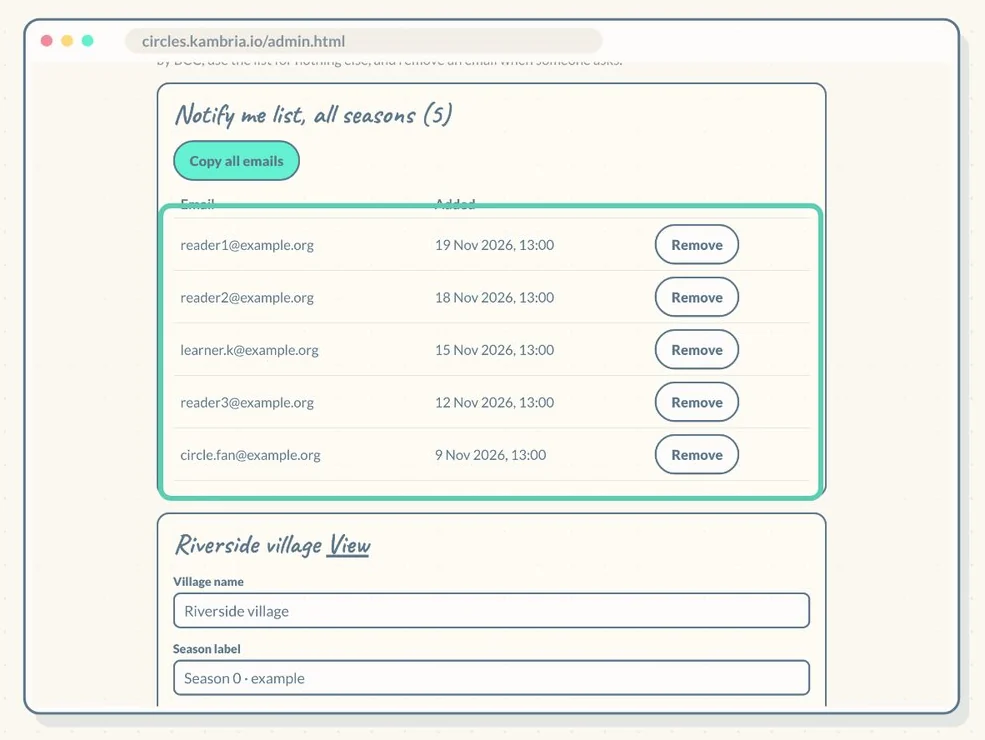
Steps
- On the lane desk, tap Practice.
- Find the card Notify me list, all seasons (N) with the number of emails.
- Tap Copy all emails. You see "Copied. Paste them into the BCC line, never To or CC."
- In your email program, paste the list into BCC and send one email about the season.
- When someone asks to be removed, tap Remove next to their email and confirm.
Good to know
- Only admins see this list. Learners can remove their own email on the Practice Circles page from the same browser.
- Use the list only for the one email about the season opening. Never put the emails in To or CC.
- Each row shows the email and the date it was added.
- The Numbers tab shows how many people pressed Notify me ("Want this season").
- When a season opens for sign-ups, the Practice Circles page shows Join instead of Notify me; the list stays here until you remove it.
If something goes wrong
- The copy button shows the emails as text instead of "Copied": your browser blocked copying. Select the text and copy it by hand.
- "Couldn’t remove. Please try again."
- "Nobody yet. People add their email on the Practice Circles page."