

Local Circles · Local · Neighbours
Explore a local challenge
Updated 20 Nov 2026
This guide helps neighbours read a challenge page: its rings, what they need, the progress and the shared fund.
Steps
- Open a challenge. From circles.kambria.io/local.html tap See this challenge under Challenges now for a real challenge, or See the example challenge. You can also open the link of a challenge you were given.
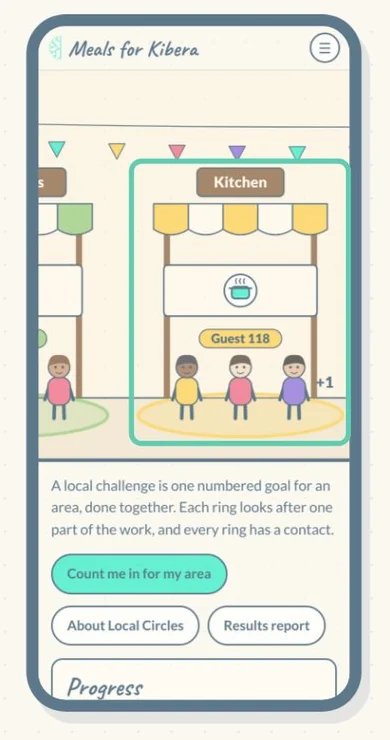
- At the top, a little street shows one stall per ring. Swipe or drag sideways to see all stalls. The hint ← drag to explore → sits at the bottom of the street. Each ring looks after one part of the work.
- Tap a stall. A panel opens with:
- what the ring does and how many people are in it, with its contact (a guest number such as "Guest 118"),
- Needs now: the jobs the ring needs help with,
- Nobody is looking after this yet. if the ring has no one.
- On the Example challenge, tap Count me in for my area or I could help with this to go to Count me in. On a real challenge you can ask to join (see "Join a ring of a challenge").
- On a real challenge, scroll to Progress: the total so far against the goal, and a log of what each contact added.
- If a funder pays for the challenge by measured results, Progress also shows Results for funders: units committed, reported and verified, how results are checked, and the milestones with the day each was reached. Each update then has evidence ↗, and ✓ verified once the Circles team has checked it.
- Scroll to Shared fund: In, Out and Balance, then every entry with its date and a receipt link. On a phone, the three boxes sit one per row.
- Tap the Shared fund stall to see the balance, the last 3 entries and See all accounts.
- If the challenge has sponsors, you see Supported by with their names and small logos.
- Tap Results report for a printable summary.
Good to know
- The Example challenge is marked Example and its numbers and guest numbers are not real.
- The shared fund only shows the accounts; it never takes payments. There is no button to pay.
- Fund entries say what money was for, never who received help.
- Contacts are shown as guest numbers or roles, never real names, phone numbers or emails.
- Questions about the fund: circles@kambria.io.
If something goes wrong
- "This challenge can’t be found." The link is wrong, or the challenge is hidden. Ask the person who gave you the link.
- "Nothing recorded yet." / "No progress recorded yet." The challenge has just started.