

Open Circles · Admins
Launch check
Updated 20 Nov 2026
This guide helps admins run the read-only launch checks before the street goes live.
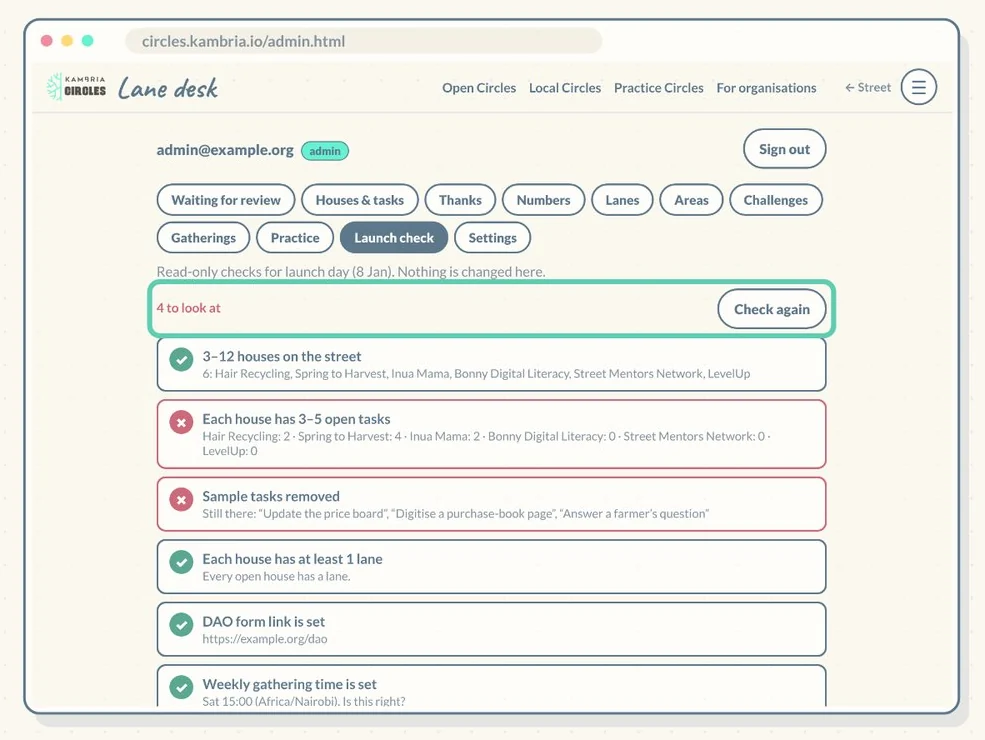
Steps
- Open Launch check in the Lane desk (between Practice and Settings).
- Read the summary: All checks pass ✓, or for example 2 to look at.
- Read each line. A green ✓ is fine, a red ✗ needs attention, and a grey mark means it couldn't be checked. Each line explains why (see "What is checked" below).
- Fix what is red: for example add tasks in Houses & tasks, add a lane in Lanes, or set a link in Settings.
- Tap Check again to see the new result.
What is checked
- 3–12 houses on the street
- Each house has 3–5 open tasks
- Sample tasks removed
- Each house has at least 1 lane
- DAO form link is set
- Weekly gathering time is set (check the day and time are right)
- CAPTCHA site key is in this build
- Strangers can’t read submitted work
Good to know
- Nothing is changed by this page. It only reads.
- The section Check by hand in Supabase lists checks the site owner does outside the Lane desk.
- Full launch checklist (docs/RA-MAT.md) opens the full team checklist.
- If Strangers can’t read submitted work is red, stop and tell the site owner straight away.
If something goes wrong
- Couldn’t check right now. Reload and try again. on a line: reload the page and tap Check again.
- 3–12 houses on the street is red: fewer than 3 or more than 12 houses are open. Switch houses on or off in Houses & tasks, then tap Check again.