

Local Circles · Local · Admins
Set up results for funders
Updated 21 Nov 2026
This guide helps admins set up a challenge that a funder pays for by measured results, and verify each progress update against its evidence.
Before you start
- Kambria and the funder have agreed, outside the website, the units committed (meals, trees, m²), how results are checked, the milestones and the price. Prices and amounts of money never go on the website.
- The challenge is a real one (not Example), and you are signed in on the admin page as an admin.
Steps
- On the admin page, tap the Challenges tab and find the challenge's card.
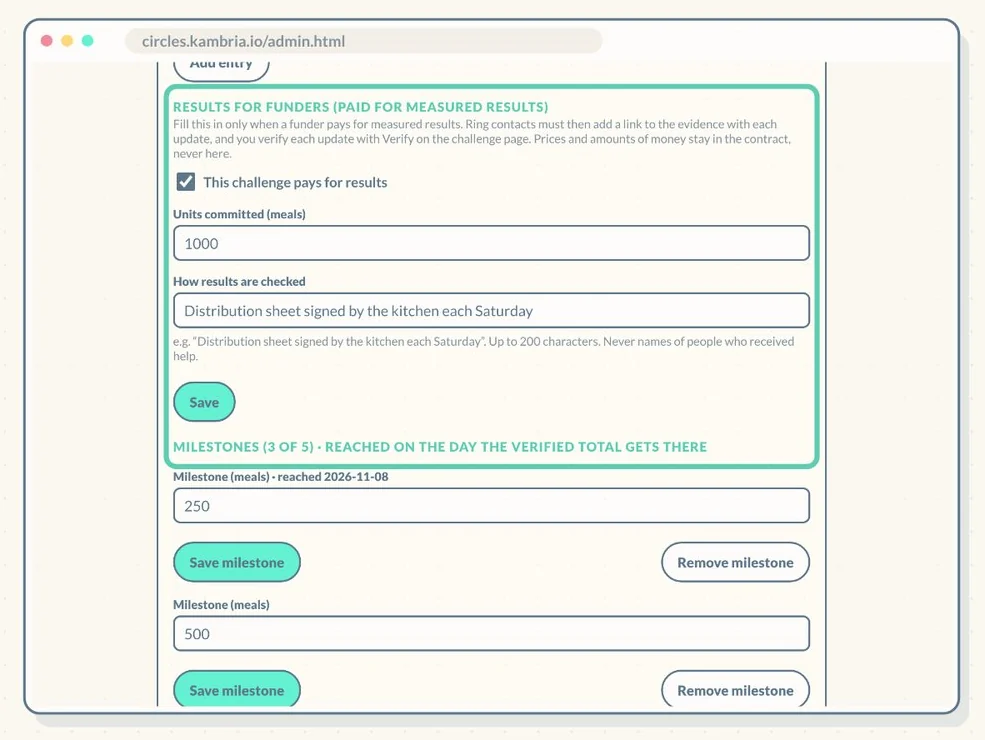
- Scroll to Results for funders (paid for measured results).
- Tick This challenge pays for results.
- In Units committed (meals), type the number agreed, for example 1000. The challenge's own unit shows in brackets.
- In How results are checked, write one line, for example "Distribution sheet signed by the kitchen each Saturday". Up to 200 characters, never names of people who received help.
- Tap Save. Milestones (0 of 5) appears below.
- Tap + Add a milestone, type a number of units in New milestone (meals), for example 250, and tap Add milestone. Add up to 5, for example 250, 500 and 1000.
- To change a milestone, change its number and tap Save milestone. To remove one, tap Remove milestone and confirm.
- When ring contacts add progress, open the challenge page (View). Sign in on My account with your admin email, one time on each device: the Lane desk sign-in doesn't carry over.
- Under Progress, each update shows evidence ↗ and a Verify button. Open the evidence and check it against "How results are checked".
- Tap Verify. The update shows ✓ verified, and the verified total in Results for funders goes up.
- Verified one by mistake? Tap Undo verify on that update.
- Each milestone gets its date by itself, on the day the verified total reaches it. On the admin page it shows as, for example, Milestone (meals) · reached 2026-11-08.
Good to know
- Once the box is ticked, every progress update that adds units needs a link to the evidence (https://). The website keeps only the link, never the photo or sheet.
- Everyone sees Results for funders on the challenge page and in the results report: units committed, reported and verified, how results are checked, the milestones and their dates, and "Funders pay outside this website, milestone by milestone. No amounts are shown here."
- Only admins see Verify. Ring contacts can't verify updates.
- If you undo a verification and the verified total falls below a milestone, the milestone shows not yet again.
- Updates added before you ticked the box have no evidence link. They count as reported, and as verified only if you verify them.
- To stop, untick This challenge pays for results and tap Save. Results for funders disappears from the challenge page.
If something goes wrong
- "Units committed must be a whole number from 1."
- "No links, emails or phone numbers in “How results are checked”."
- "A milestone is a whole number from 1."
- "Up to 5 milestones per challenge."
- "Only the Local Circles team verifies results." Sign in on My account with your admin email.
- "This update is gone." Reload the page.
- You don't see Results for funders on the admin page: it shows only on real challenges, not on the Example challenge.