

Practice Circles · Practice Circles · Facilitators
Write the note for the ownership report
Updated 21 Nov 2026
This guide helps facilitators of an organisation's village open its ownership report and write a short note for it.
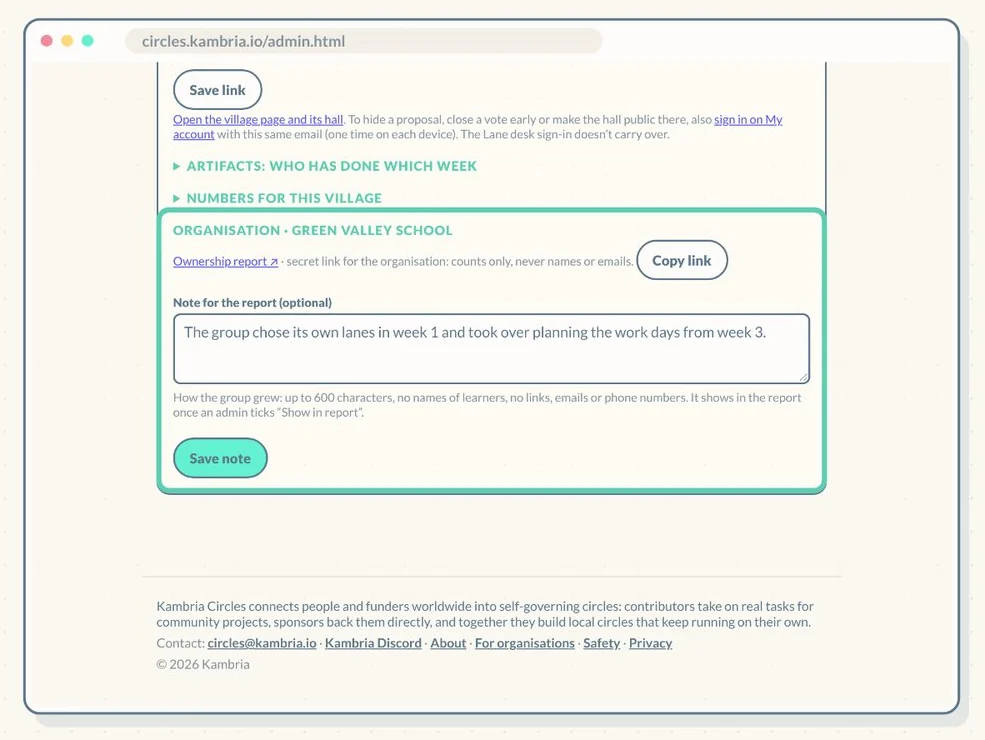
Before you start
- An admin created the village for an organisation and chose you as its facilitator.
- You are signed in on the lane desk.
Steps
- On the lane desk, tap My villages and find the village. Its card shows Organisation · and the organisation's name.
- Tap Ownership report ↗ to see the report the organisation reads, or Copy link to copy its link.
- In Note for the report (optional), write how the group grew, for example "The group chose its own lanes in week 1 and took over planning the work days from week 3." Up to 600 characters.
- Tap Save note. The note is saved but doesn't show in the report yet.
- Tell an admin the note is ready. It shows in the report under Note from the facilitator once an admin ticks Show the note in the report.
- To change the note, edit it and tap Save note again. The report then hides it until an admin shows it again.
- To remove the note, empty the box and tap Save note.
Good to know
- Write about the group, not about one person: no names of learners, and no links, emails or phone numbers.
- The report shows counts only. Learners never see the report link or the note.
- Anyone with the report link can read the report, so don't post it on Discord. The organisation gets it from the Circles team.
- Admins can change the note too.
If something goes wrong
- "Up to 600 characters, with no links, emails or phone numbers. No names of learners."
- "Only the village's facilitator or an admin can write this note." Check you signed in with the email the admin added.
- You don't see Organisation · on a village: it is not an organisation's village, and it has no report.