

Local Circles · Local · Admins
Read the Local Circles numbers
Updated 20 Nov 2026
This guide helps admins read how Local Circles is doing.
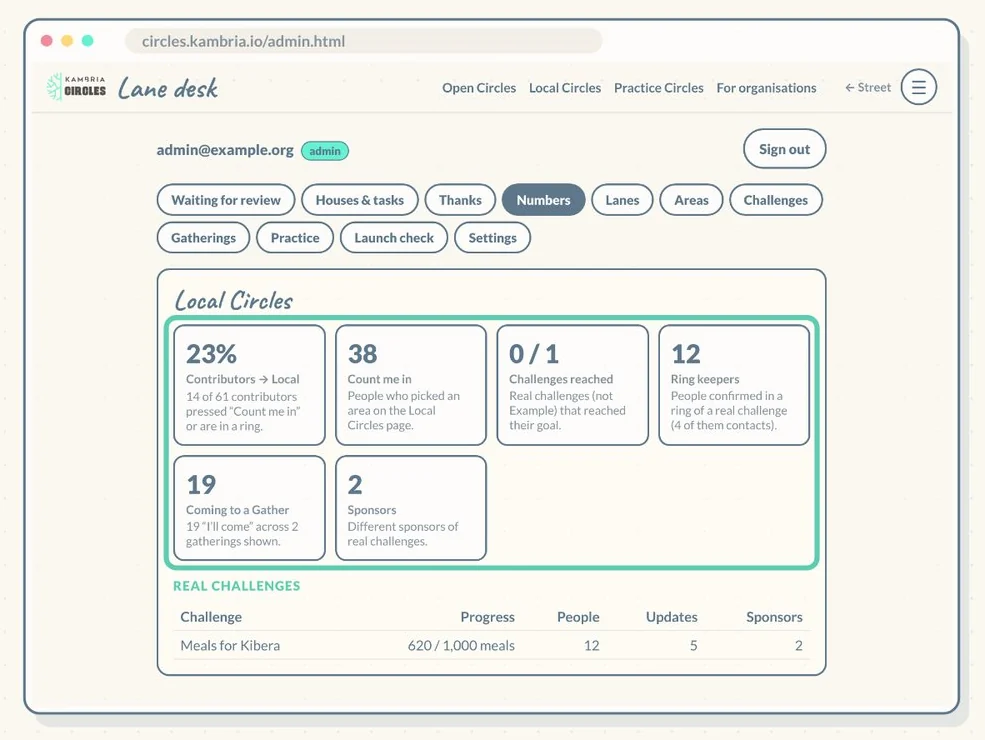
Steps
- On the admin page, tap the Numbers tab.
- Scroll to the end, to the card Local Circles.
- Read the six numbers:
- Contributors → Local: the share of Open Circles contributors who pressed "Count me in" or are in a ring.
- Count me in: people who picked an area on the Local Circles page.
- Challenges reached: real challenges (not Example) that reached their goal, out of all real challenges.
- Ring keepers: people confirmed in a ring of a real challenge (and how many of them are contacts).
- Coming to a Gather: people who said "I’ll come", across the gatherings shown.
- Sponsors: different sponsors of real challenges.
- Under Real challenges, read one row per challenge: Progress, People, Updates and Sponsors. Hidden challenges show "(hidden)".
Good to know
- These are counts only, never names or emails.
- The Example challenge is never counted.
- For area totals, open the Areas tab. For how many are coming to each gathering, open Gatherings.
If something goes wrong
- The card says "Local numbers aren’t ready yet. Please tell the Open Circles team.": the numbers are not switched on yet. Tell the Open Circles team.
- Numbers look old: reload the page.