

Practice Circles · Practice Circles · Learners
Village hall: make a proposal
Updated 20 Nov 2026
This guide helps learners put a proposal to their village.
Before you start
- The season has started. "Proposals open on the first day of the season."
- You have no other open proposal.
Steps
- In your village, tap the Village hall and then Go to the hall: vote or propose, or scroll down to Village hall.
- Tap New proposal.
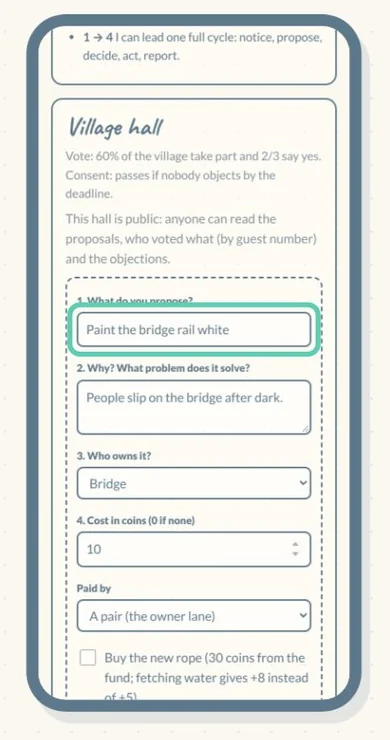
- Fill in the six numbered parts of the form:
- What do you propose?
- Why? What problem does it solve?
- Who owns it? (The whole village, Pond, Garden, Bridge or Welcome)
- Cost in coins (0 if none) and Paid by: Nobody (no cost), A pair (the owner lane) or, from week 4, The village fund
- How will we know it worked?
- Review on (a date)
- From week 4 you can tick Buy the new rope (paid from the fund; fetching water then gives +8 instead of +5).
- Under How the village decides, pick Vote or Consent: passes if nobody objects. Pick a Deadline: 24, 48 or 72 hours, or 1 week.
- Tap Put it to the village. Your proposal shows as Open with "closes in …".
- To change it, tap Edit, then Save changes (votes start again). To take it back, tap Withdraw and confirm.
Good to know
- One open proposal per person. Write another once it closes or after you withdraw it.
- Keep it short: what up to 200 characters, why 300, how you’ll know 200. No links, emails or phone numbers.
- Editing removes the votes already given and starts the deadline again.
- The result is counted at the deadline (see "Village hall: vote or object").
- In an open village, anyone can read proposals, with your guest number. In a team village, the hall is private unless your facilitator makes it public.
- If sponsors back your village, a Supported by and Milestones box shows at the top of the hall: the sponsors’ names and each milestone with "now …" or "✓ reached …". The website counts the milestones itself; no amounts are shown.
- Your facilitator can hide a proposal and tells you why. They can also unhide it: it then goes back to how it was before.
If something goes wrong
- "Fill in what, why and how you’ll know it worked."
- "Keep each part short: what 200, why 300, how you’ll know 200 characters."
- "No links, emails or phone numbers in a proposal."
- "Pick a review date." The date must be today or later.
- "Say who pays: the village fund or a pair." / "A cost paid by a pair needs the lane that pays it."
- "The village fund opens in week 4."
- "You already have an open proposal. Wait for it to close, or withdraw it."