

Practice Circles · Practice Circles · Admins
Translate Practice content
Updated 20 Nov 2026
This guide helps admins translate the 8 weeks, the Example village and the self-check questions.
Before you start
- The language is listed in Settings → Languages. Learners see it only when it is open to guests; before that you can test it with ?lang= and the language code in the page address.
Steps
- On the lane desk, tap Practice.
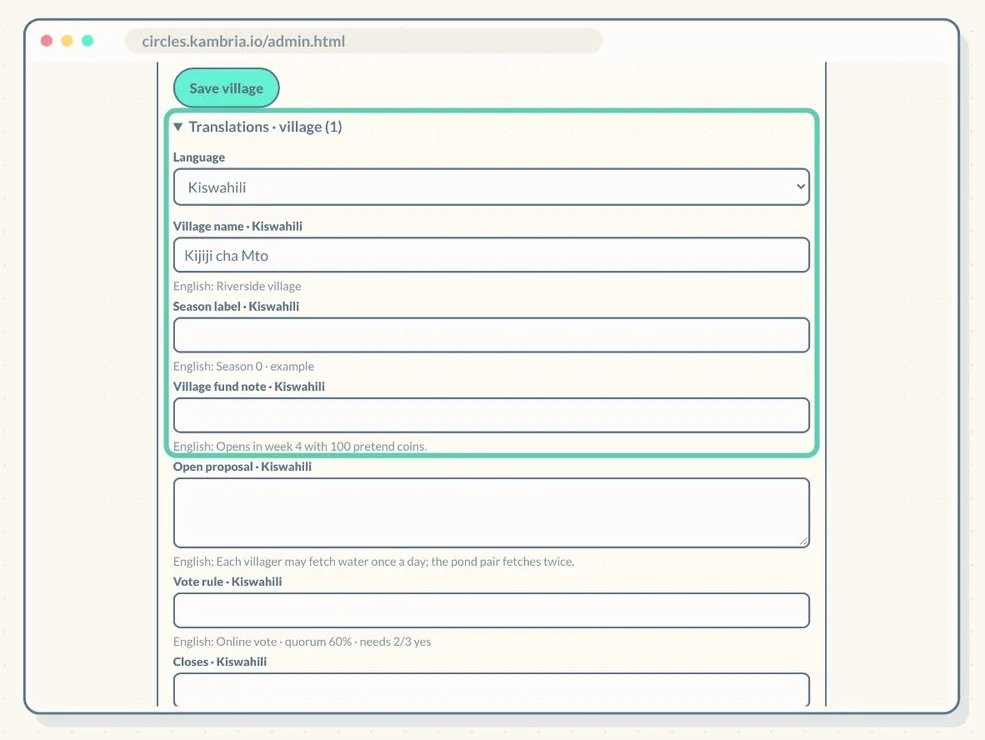
- Find the Translations box under the part you want: Translations · village, under each lane, Translations · Week … (for the week chosen in Week to edit) or Translations · Question ….
- Open the box and pick the Language.
- Each field shows the English under it ("English: …"). Type the translation in the box.
- Tap Save translation. The box title shows how many languages are done.
- Open the page with that language chosen to check it.
Good to know
- Leave a box empty to show the English there. Translations are public, like the English.
- If someone changes the English later, the box says "English changed after this translation: please check it."
- Only admins can change Practice content and its translations.
- There is no machine translation on the site.
- Not translated: buttons and menus, what learners write in the hall, and document names on certificates already issued.
- A language not open to guests shows "(not open to guests yet)" in the list.
If something goes wrong
- "No languages yet. An admin adds them in Settings → Languages."
- "… : up to … characters." Shorten the translation.
- "You don’t have permission to change this." Sign in with an admin email.