

Open Circles · Guests & contributors
Keep your lanterns with an email
Updated 20 Nov 2026
This guide helps guests keep their guest number, tasks and lanterns with an email, sign in on another device, and delete their account.
Before you start
- You need to have taken at least one task on this browser, or come from a page that asks for an email to join (a ring of a Local challenge, or a Practice season).
- The email is optional. You can always stay a guest.
Steps
Keep your lanterns
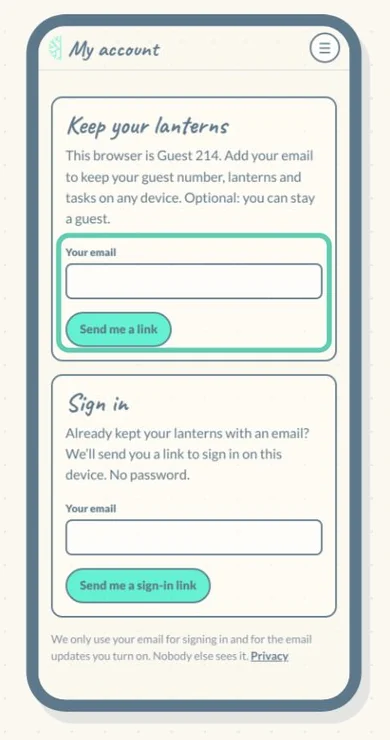
- Open My tasks (or the ☰ menu → Sign in). Find the box Keep your lanterns.
- Type your email in Your email and tap Send me a link.
- You see Check your inbox. Open the email "Confirm your email for Kambria Circles" and tap its button.
- The My account page opens and says You’re Guest 214 on any device now. The ☰ menu now shows My account instead of Sign in.
Sign in on another phone or computer
- Open the ☰ menu → Sign in.
- Under Sign in, type the same email and tap Send me a sign-in link. Open the email "Sign in to Kambria Circles" and tap the link. No password is needed.
- You see the same guest number, My tasks and lanterns as on your first device.
Sign out or delete your account
- On My account, tap Sign out to leave this device.
- To delete everything, tap Delete my account and confirm twice. You see Account deleted.
Good to know
- We only use your email for signing in and for the email updates you turn on. Nobody on the site sees it, not even the lanes; the admins only see how many guests have an email.
- Deleting removes your email, your tasks, your lanterns, the area you picked for Count me in, your Practice Circles season and village, and your email updates. It can't be undone.
- If this browser already is a guest with tasks, signing in to another account replaces it on this browser; those tasks stay with the old guest number. The page warns you first.
- The same account works for Local Circles and Practice Circles.
- New here and sent from Keep your lanterns with an email to join on a challenge? My account says “Add your email to join. You’ll be Guest …”. Type your email and tap Send me a link. The link in the email brings you back to the challenge.
If something goes wrong
- Type your email first. / That email doesn’t look right.
- This email already has an account. Use “Sign in” below instead.
- There’s no account with this email yet. Take a task on the street, then keep it with your email from My tasks.
- An email was just sent. Please wait … seconds before asking for another one. or Too many emails were sent… Wait, then try again.
- No email after 2 minutes? Look in your spam or promotions folder.
- That link didn’t work (it may have expired or been used already). Please ask for a new one.
- Take a small task on the street first; then you can keep it with your email. Already done that? Sign in below. You opened My account on a new browser. Take a task on the street, or sign in if you already have an account.