

For organisations & sponsors
Practice · Sponsor a village's milestones
Updated 21 Nov 2026
This guide helps companies and ESG funds sponsor the milestones of a Practice Circles village, and follow them on the village page and in its report.
Before you start
- You'd like to back a group of adults who learn to run their own community, and pay only when they reach clear milestones.
- You don't need an account on the website.
Steps
- Open the ☰ menu → For organisations, or go to circles.kambria.io/partners.html.
- Under Work with us, tap Become a sponsor. An email to circles@kambria.io (or a short form) opens. Say who you are and that you'd like to sponsor a Practice village.
- Agree with Kambria which village, which milestones and what each one is worth. Kambria charges a management fee by invoice. All of this happens outside the website.
- A Circles admin adds you to the village (your name, and if you like your logo and website) and adds up to 5 milestones.
- Choose each milestone from what the website already counts:
- % of the village earn a certificate: the share of the village's people who finish the season with a certificate.
- Mini-cycles led (all 5 steps): how many times someone led a full small cycle: notice, propose, decide, act, report.
- Proposals passed: how many proposals the village agreed in its hall.
- % of the village active in week …: the share of people who did at least one daily task in that week of the season (week 0 to 7).
- Artifacts done: how many weekly documents the village's people finished.
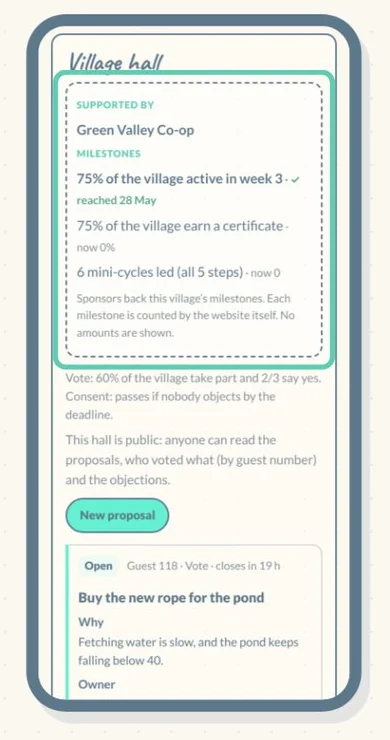
- Open the village page. At the top of the Village hall you see Supported by with your name, and Milestones: each one shows "now …" (for example "now 50%"), or "✓ reached 28 May" once it is reached. The page is public for open villages; for team villages only their members, the facilitator and admins see it.
- Open the report link the Circles team sends you (circles.kambria.io/village-report.html?k=…). No account is needed. The report shows the village's numbers and a Milestones part with your name and a Milestone / Reached table.
- When a milestone is reached, pay Kambria for it outside the website, as agreed. Then follow the next one.
Good to know
- The website marks a milestone reached on the day its number first gets there. Nobody types it by hand. If the number falls back, the date goes away until it is reached again.
- No amounts are shown anywhere: only your name, logo and website.
- Up to 3 sponsors can back one village.
- The report shows counts only, never names, emails or anyone's answers. Anyone with the link can read it: keep it inside your organisation.
- The website takes no payment, and keeps nothing you write in the email or form.
If something goes wrong
- This report link doesn’t work. Ask the Kambria Circles team for a new one. The link is incomplete, or a new link was made. Write to circles@kambria.io.
- You don't see Supported by on a team village: only its members, its facilitator and admins see the hall. Use the report link instead.
- The button doesn't open an email: your device may have no email app. Write to circles@kambria.io yourself.