

Practice Circles · Practice Circles · Facilitators
Moderate the village hall
Updated 20 Nov 2026
This guide helps facilitators keep a village hall safe and fair.
Before you start
- Sign in on My account with the same email you use on the lane desk. Without this, the hall shows no facilitator buttons. The quickest way: tap sign in on My account in My villages, or on the village page ("Facilitator of this village? …").
Steps
- On the lane desk, open My villages and tap Open the village page and its hall.
- Scroll to Village hall.
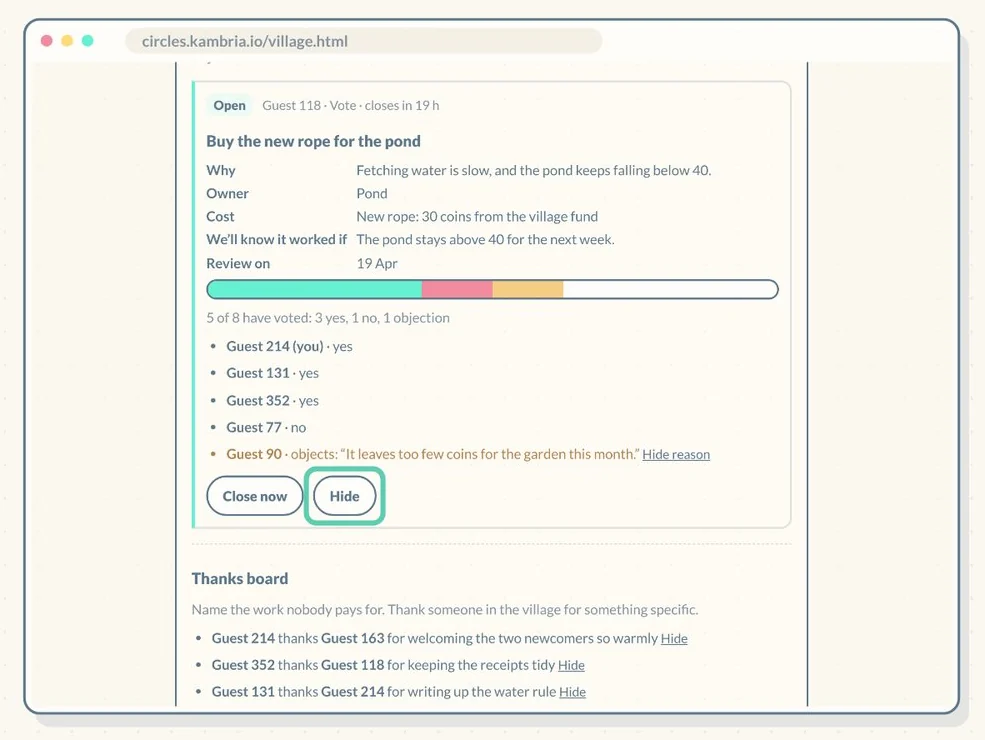
- To end a vote early, tap Close now on an open proposal and confirm "Close the vote now and count the result?".
- To hide a proposal, tap Hide. Type a reason in "Why hide this proposal? (shown to its author)" and tap OK. The reason needs at least 3 characters.
- To hide the reason of an objection, tap Hide reason next to it and confirm.
- To undo a Hide, tap Unhide on the hidden proposal and confirm "Show this proposal again, as it was before it was hidden?". For a hidden objection reason, tap Show reason.
- To hide a thanks on the Thanks board, tap Hide next to it and confirm.
- In a team village, tap Make the hall public (the team agreed) only when the team agrees. Tap Make the hall private to close it again.
Good to know
- Close now counts the result with the votes given so far, using the same rules as the deadline.
- Others see a hidden proposal as "Hidden by the facilitator". Hidden text is never public. The author sees your reason.
- A hidden objection still counts as an objection; only its reason is hidden.
- Unhide puts a proposal back as it was before you hid it: an open vote goes on (if its deadline passed meanwhile, it is counted now), and a proposal that had passed or failed keeps its result. Nothing already counted is counted again. A hidden thanks has no undo.
- An open village's hall is always public. A team village's hall is private until you make it public.
- In the village you see "You are looking as the facilitator or an admin: only villagers do the tasks." You can't vote or propose.
- Follow the Kambria community rules; talk to people on Discord before hiding when you can.
If something goes wrong
- No Close now or Hide buttons: sign in on My account with your facilitator email, then reload the village page.
- "Only the village’s facilitator or an admin can do this." You are signed in with another email, or you are not this village's facilitator.
- "Write a short reason (at least 3 characters) to hide this proposal." Tap Hide again and type a longer reason. Tapping Cancel does nothing.
- "This proposal was hidden before Unhide existed and its vote has ended, so it can’t be shown again." This only happens to proposals hidden before Unhide was added.
- "The author has opened another proposal since, so this one can’t be reopened." One open proposal per person: try again after the author’s other proposal closes.