

Open Circles · Guests & contributors
Your lantern and the thank-you tree
Updated 20 Nov 2026
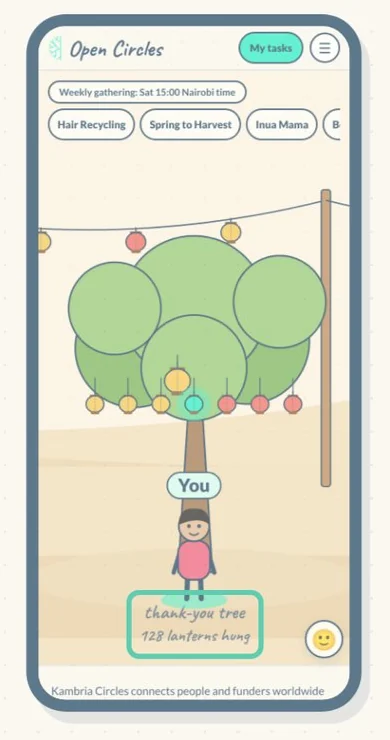
This guide helps contributors find their lantern on the thank-you tree and read the thanks from projects.
Steps
- Find the thank-you tree in the middle of the street. Under it you see how many lanterns are hung, for example 12 lanterns hung, or Be the first to hang a lantern.
- Tap a lantern. A line appears for a few seconds, for example Guest 214 · Update the price board · Spring to Harvest.
- Your own lanterns are mint and glow. Tapping one shows Your lantern · ….
- From My tasks, tap See your lantern on a confirmed task: the board closes and the street walks to the tree.
- Watch for paper lanterns floating over the street: these are thank-yous written by the projects. Tap one and the street walks to that house.
- Open a house to read its latest thanks under Thanks from the team.
Good to know
- One lantern is hung for each confirmed task. A bigger task hangs a big lantern.
- The tree shows the 40 newest lanterns.
- Everyone can see a lantern's guest number, task title and house name. Nobody else sees the link or note you sent.
- Up to 3 thank-yous from the last 7 days float over the street. If your phone is set to reduce motion, they fade in and out instead of floating.
- During the weekly gathering, the lanterns on the tree glow.
- My journey lists all your lanterns under Your lanterns.
If something goes wrong
- No lantern after a few days? Open My tasks: if the task still says Waiting for the lane, the project has not checked it yet. If it says Returned, read the note and send it again.
- You don't see your lantern as yours on another device? Keep your lanterns with an email and sign in on that device (see "Keep your lanterns with an email").