

Local Circles · Local · Ring contacts
Leave a ring or hand it over
Updated 20 Nov 2026
This guide helps ring members leave a ring, and helps contacts hand their ring to someone else.
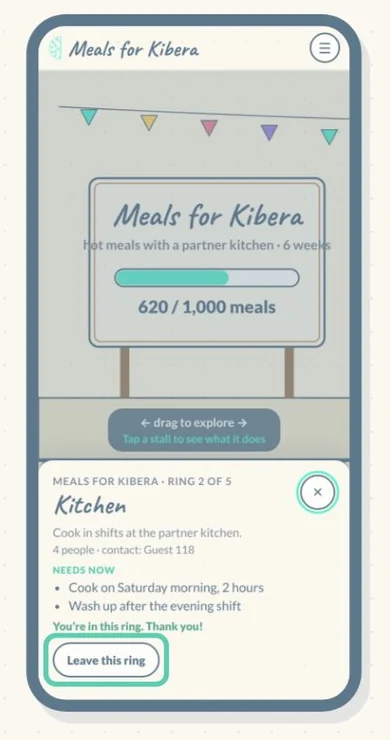
Steps for a ring member
- Open the real challenge page and tap the stall of your ring.
- Tap Leave this ring (or Cancel my request if you are still waiting).
- Tap OK on Leave this ring?
- The ring’s number of people goes down. You can now join another ring of this challenge.
Steps for a ring contact
A contact has no Leave this ring button. Instead the ring panel says "To leave this ring, ask the Local Circles team to choose a new contact first."
- Write to the Circles team at circles@kambria.io and say which ring you want to hand over. If someone in the ring can take over, give their guest number.
- An admin chooses the new contact on the admin page (Make contact). If nobody can take over yet, the admin can remove you from the ring instead; the ring then has no contact until a new one is chosen.
- You become a normal member. Now you can tap Leave this ring if you want.
Good to know
- You can only be in one ring per challenge. To move to another ring, leave first.
- Leaving removes you from the ring’s list. Your past progress notes stay in the log.
- Delete my account on My account also removes you from rings.
If something goes wrong
- "You seem to be offline. Please try again when you’re back online."
- "Something went wrong. Please try again." Reload the page and try again.