

Local Circles · Local · Neighbours
Count me in for your area
Updated 20 Nov 2026
This guide helps neighbours tell Kambria Circles which area they live in, and change or remove it later.
Steps
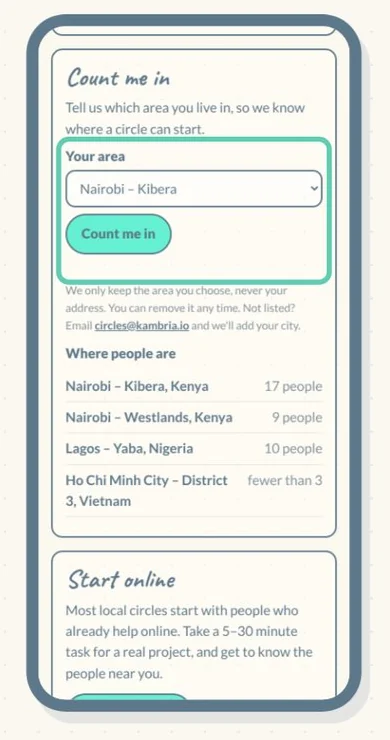
- Open circles.kambria.io/local.html and scroll to Count me in. (The Count me in for my area buttons on other Local pages bring you here.)
- Under Your area, open the list Choose your city or region…. Areas are grouped by country.
- Pick your city or region.
- Tap Count me in. The button shows Saving…. The first time, you may see a short "are you a person?" check.
- You see "You’re counted in your area. Thank you!"
- To pick another area, tap Change, choose the new area and tap Count me in again. You can only be in one area.
- To stop being counted, tap Remove me. You see "Removed. We no longer keep your area."
- Under Where people are, see how many people are in each area.
Good to know
- We only keep the area you choose, never your address or exact location. There is no map and no GPS.
- Choosing an area is optional. You can change or remove it any time.
- Everyone sees only a total for each area. Areas with 1 or 2 people show fewer than 3. Areas with nobody are not listed.
- Nobody on the site, not even admins, can see which area you picked.
- Your area is linked to your guest number on this browser. If you keep your lanterns with an email, it follows your account. Delete my account on My account also removes it.
- Your city is not in the list? Email circles@kambria.io and we’ll add it.
If something goes wrong
- "Choose your area first." You tapped Count me in without picking an area.
- "Count me in isn’t available right now. Please try again later." The list could not load. Try again later.
- "You seem to be offline. Please try again when you’re back online." Check your internet connection.
- "Something went wrong. Please try again." Wait a moment and try again.