

Practice Circles · Practice Circles · Learners
Your village each day
Updated 20 Nov 2026
This guide helps learners do their daily task and choose a lane in their village.
Before you start
- You are in a village (see "Join a season and a village") and signed in with your email.
Steps
- Open the season page and tap Open your village.
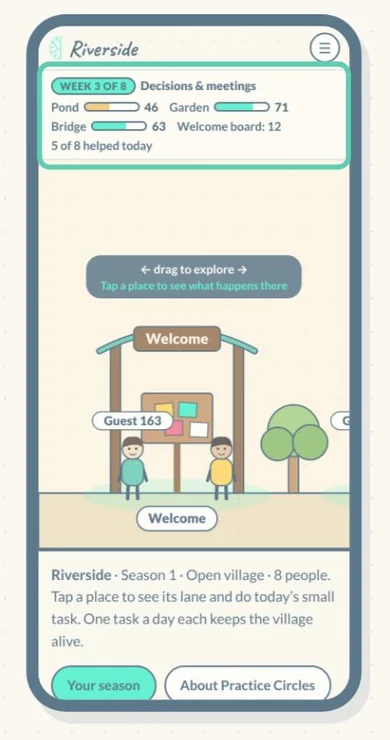
- Look at the top bar: "Week 1 of 8" (in the last week, "Week 7 · last week"), the Pond, Garden and Bridge meters (0 to 100), "Welcome board" and how many people "helped today".
- Drag or swipe the village sideways and tap a place (Pond, Garden, Bridge or Welcome).
- Under Daily task (a few minutes, once a day), tap the task button:
- Fetch water from the stream (+5 pond)
- Water the garden (+5 garden, takes 3 from the pond)
- Check the bridge (+5 bridge)
- Write a hello on the welcome board (+1 welcome board)
- You see one message, for example "Thank you! You helped today (fetch water from the stream). The village is a little better. Come back tomorrow."
- From week 1, choose your lane: tap Join this lane. You see "You hold the Pond lane now." During week 1 you can also tap Move to the … lane or Leave this lane.
- Scroll down to read this week's card. Tap a button after Cards: to read an earlier week again. Tap open the template and then File → Make a copy to start your document.
Good to know
- One task a day per person (the day follows UTC time). You can help at any place, but your own lane's task comes first.
- The meters go down a little every day. A lane held by a pair goes down more slowly.
- Each lane is held by a pair: at most 2 people. Without a lane you are a "floating helper".
- Lanes are chosen in week 1. After week 1, lanes are fixed: nobody can change yours, but you can still help at any place.
- Before the season starts you can look around, but daily tasks start on the first day.
- Only the village's members, its facilitator and the admins see the village itself.
- Chat with your village on its Discord channel; the website has no chat.
If something goes wrong
- "You already helped today. Come back tomorrow."
- "Daily tasks start on the first day of the season."
- "Full: 2 of 2. You can still help here as a floating helper."
- "Lanes are chosen in week 1. In week 0 everyone helps everywhere."
- "Lanes are fixed after week 1, so yours can’t change now." Keep helping in your lane, or anywhere as a helper.
- "Sign in with your email to open your village." Tap Sign in and use the same email.
- "This village is only for its members." You are signed in with a different email.