

Open Circles · Guests & contributors
Send your work in My tasks
Updated 20 Nov 2026
This guide helps guests send their finished work, fix work that came back, or drop a task.
Steps
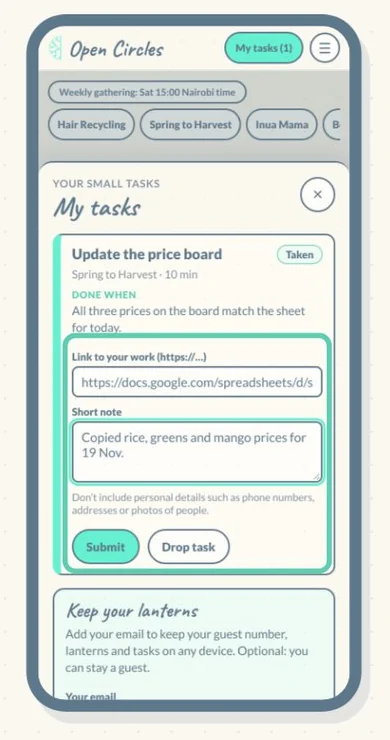
- Tap My tasks at the top of the street. You see your tasks, each with a status: Taken, Waiting for the lane, Returned or Confirmed.
- Find the task with the status Taken.
- In Link to your work (https://…), paste a link to what you made, for example a shared sheet or document.
- In Short note, write what you did (the box says "What did you do?"). You can send a link, a note, or both.
- Tap Submit. The status changes to Waiting for the lane, with the message "The lane will check it against “Done when”. Come back later to see the result."
- Come back later. If the lane confirmed your work, you see Confirmed and "Thank you! Your lantern is on the thank-you tree." Tap See your lantern to go to the tree.
- If the status is Returned, read the Note from the lane, fix your work, and tap Submit again.
- Changed your mind? Tap Drop task on a task that is Taken or Returned. It leaves My tasks, and you can take another task.
Good to know
- The link must start with https:// and be at most 500 characters. The note can be up to 1,000 characters.
- You can hold 2 tasks to finish (Taken or Returned) at a time. Work that is Waiting for the lane doesn’t count, so you can take a new task while you wait.
- Only you and the people who look after that house (its lanes and the Circles admins) can see your link and note. Everyone else only sees your lantern.
- Don't include personal details such as phone numbers, addresses or photos of people.
- My tasks also shows See my journey →, and the Keep your lanterns box if you have no email yet.
- You can turn on an email for when a lane checks your task (see "Email updates").
If something goes wrong
- Add a link or a short note about what you did. Both boxes are empty.
- The link must start with https:// (no spaces). or That link doesn’t look right. Copy the full link again.
- The link is too long (max 500 characters). / The note is too long (max 1000 characters).
- You seem to be offline. What you typed is still here: try again when you’re back online. Your text is kept; tap Submit again when you are online.
- My tasks can’t be loaded right now. Please try again later.
- Something went wrong. Please try again.