

Practice Circles · Practice Circles · Facilitators
Review learners' artifacts
Updated 20 Nov 2026
This guide helps facilitators look at each learner's weekly document and mark it seen.
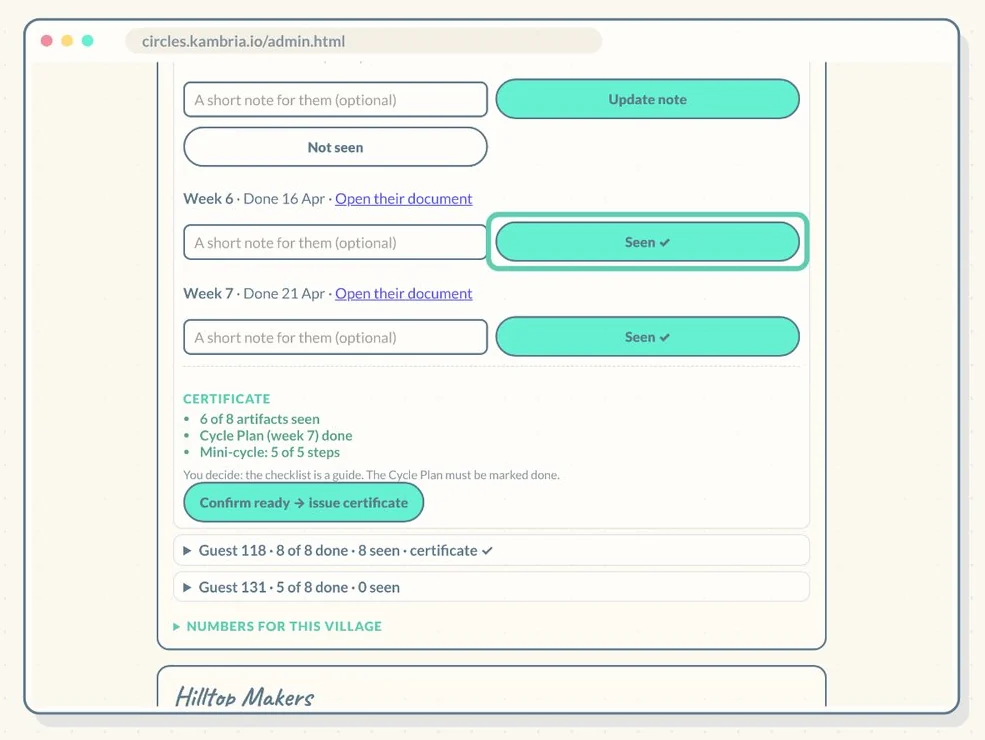
Steps
- On the lane desk, open My villages.
- Under your village, tap Artifacts: who has done which week.
- Tap a learner, for example "Guest 12 · 3 of 8 done · 2 seen".
- For a week marked done, tap Open their document.
- Type a short note in "A short note for them (optional)".
- Tap Seen ✓. The learner now sees "Seen by your facilitator ✓" and your note in My artifacts.
- To change the note later, edit it and tap Update note. To take back "Seen", tap Not seen.
Good to know
- Only you (for your villages) and the admins see these links. Other learners never do.
- The website keeps only the link and dates, never the document.
- When a learner changes their link, "Seen" is removed and the week waits for you again.
- "no link shared" means the learner marked the week done without a link. Ask them on Discord to share it if you need to see it.
- If the document doesn't open, ask the learner to share it as "Anyone with the link can view".
- You can mark a week seen only after the learner marked it done.
- Keep notes kind and short (up to 300 characters).
If something goes wrong
- "The learner hasn’t marked this artifact done yet."
- "Keep the note under 300 characters."
- "Only the facilitator of this person’s village or an admin can do this."