

Local Circles · Local · Admins
Translate Local content
Updated 20 Nov 2026
This guide helps admins translate Local Circles content: areas, challenges, rings and gatherings.
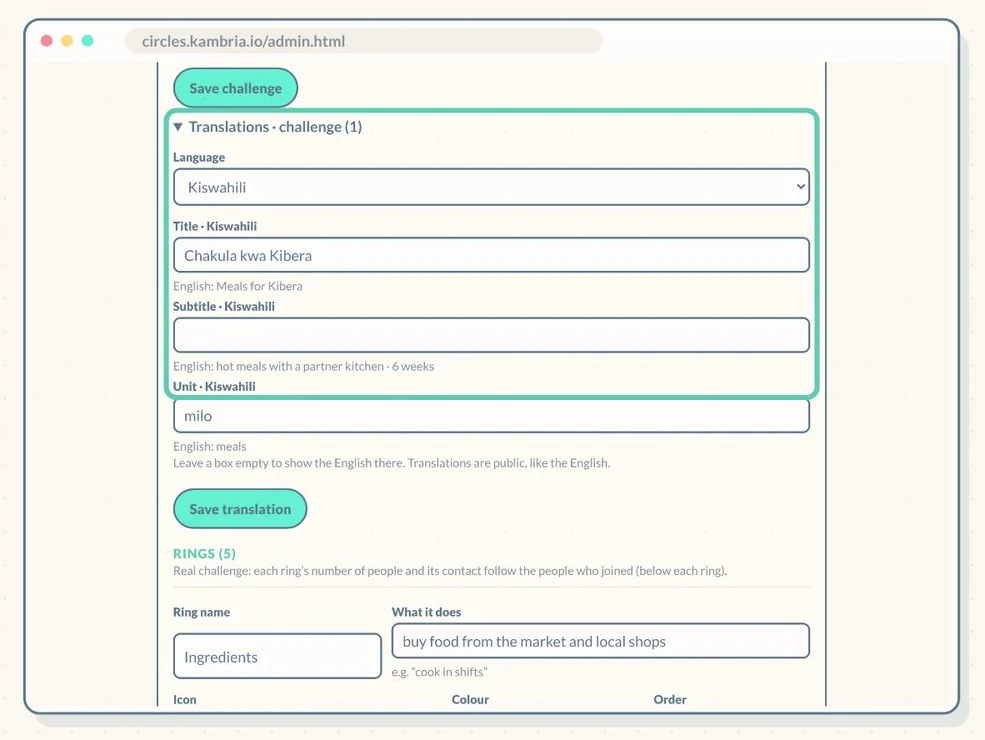
Before you start
- A language must exist in Settings → Languages. To add one, tap + Add a language, type the Code (for example sw) and Name (for example Kiswahili), and save. Tick Open to guests only when the translations are ready.
Steps
- On the admin page, open Areas, Challenges or Gatherings.
- Under an area, a challenge, a ring or a gathering, tap Translations.
- Pick the Language.
- Type the translation in each box. The hint under the box shows the English. The boxes are:
- Areas: Name, Country.
- Challenges: Title, Subtitle, Unit.
- Rings: Ring name, What the ring does, Needs now (one per line).
- Gatherings: Title, Public place, About.
- Tap Save translation.
- Check the page in that language: tap ☰ Menu → Language (or, before the language is open, add ?lang=sw to the address).
Good to know
- Leave a box empty to show the English there.
- Translations are public, like the English.
- If someone changes the English later, you see "English changed after this translation: please check it."
- Buttons, the safety reminder, numbers, the shared fund and sponsor names are not translated here.
- No machine translation: people write every translation.
If something goes wrong
- "No languages yet. An admin adds them in Settings → Languages."
- "You don’t have permission to change this." Sign in with an admin email.