

Open Circles · Guests & contributors
Say hello and the weekly gathering
Updated 20 Nov 2026
This guide helps guests greet other people on the street and join the weekly gathering at the thank-you tree.
Steps
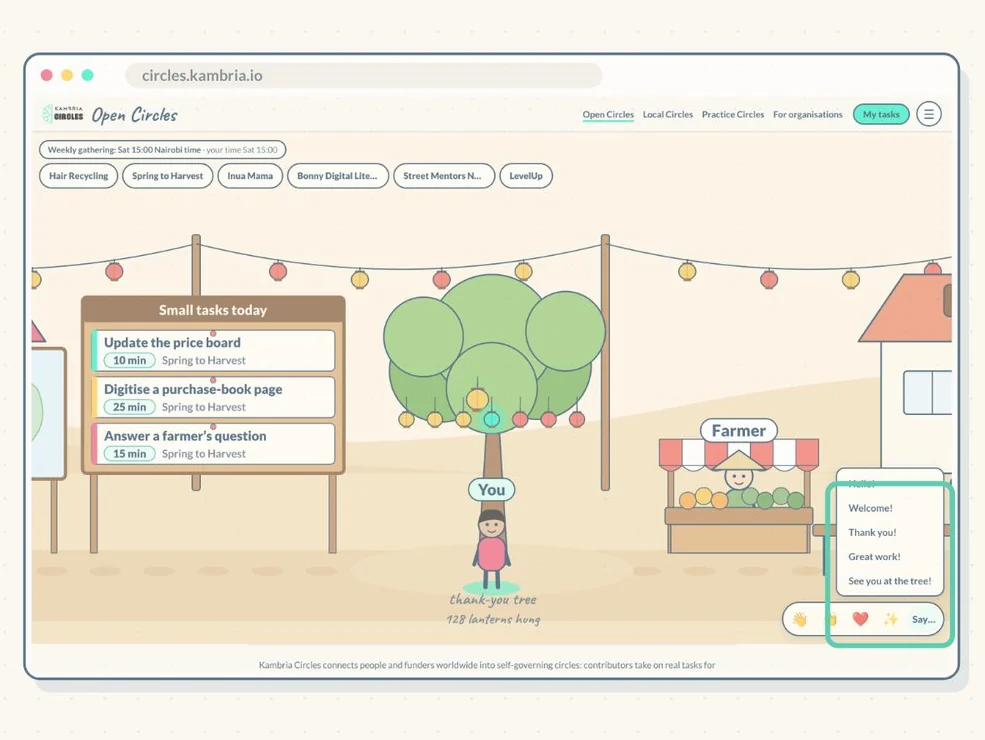
- On a computer, find the hello buttons at the bottom right: 👋 (Wave), 👏 (Clap), ❤️ (Love), ✨ (Sparkle) and Say…. On a phone, tap the 🙂 button at the bottom right to show them; the button turns into ×.
- Tap an emoji. It floats up over your avatar. People standing near you on the street see it too.
- Tap Say… and choose a greeting: Hello!, Welcome!, Thank you!, Great work! or See you at the tree!. A bubble with your greeting shows over your avatar for a few seconds.
- To close the buttons on a phone, tap × or tap outside.
- Under the people counter, read the weekly gathering bar, for example Weekly gathering: Fri 14:30 Ho Chi Minh time · your time 09:30.
- When the gathering is on, the bar says The weekly gathering is on now. Tap Go to the tree and the street walks to the thank-you tree, where the lanterns glow.
Good to know
- There is no free chat on the street: only these emoji and ready-made greetings.
- After each tap the buttons rest for about 1.5 seconds, so nobody is flooded.
- "Your time" is worked out from your phone or computer clock.
- With an email account you can get a reminder email within the hour before the gathering (see "Email updates").
- On a phone held sideways, the gathering time is hidden to save space.
If something goes wrong
- Nobody sees your emoji? They only show to people near you on the street, and only while you are online.
- The gathering bar is missing: the Circles team has not set a gathering time yet.