

Open Circles · Admins
Add a language for translations
Updated 20 Nov 2026
This guide helps admins add a language so lanes can translate their houses and tasks, and open it to guests.
Steps
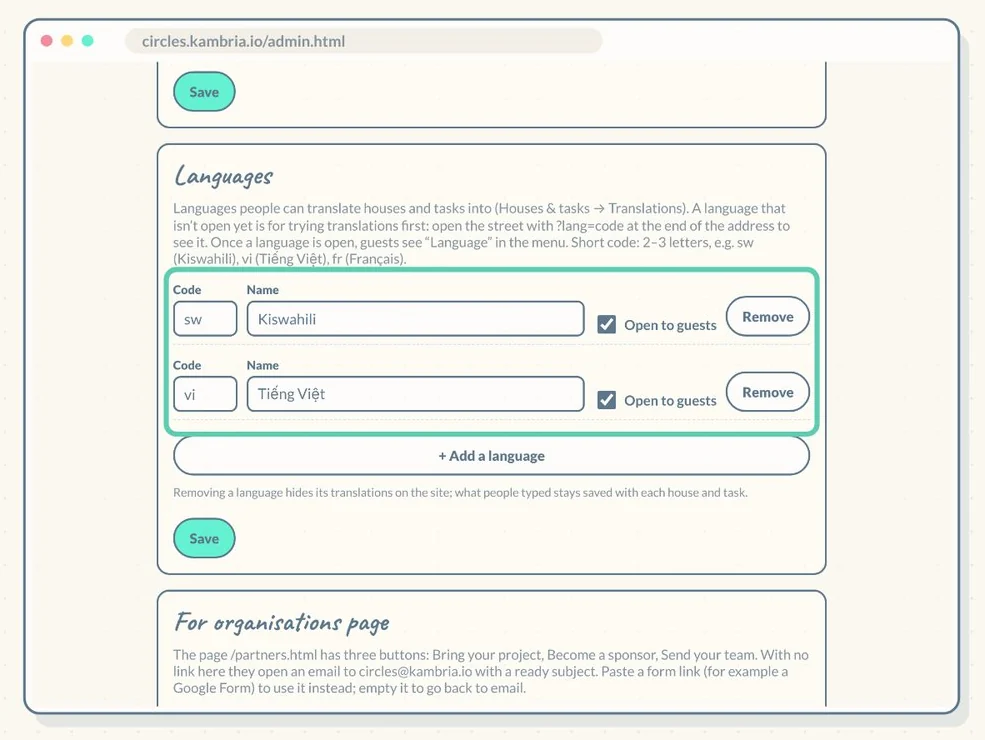
- Open Settings and find the Languages card.
- Tap + Add a language.
- Type the short Code, for example sw, vi or fr, and the Name people will see, for example Kiswahili.
- Leave Open to guests unticked while lanes translate. Tap Save.
- Ask the lanes to translate (Houses & tasks → Translations). To check, open the street with ?lang=sw at the end of the address.
- When enough is translated, tick Open to guests and tap Save. Guests now see Language in the ☰ menu.
- To hide a language, tap Remove on its row, then Save.
Good to know
- English is always there; you don't need to add it.
- Up to 12 languages.
- Removing a language hides its translations on the site; what people typed stays saved with each house and task.
- Missing translations show in English. There is no machine translation.
- The Practice Circles and Local Circles sections of the Lane desk also have Translations boxes that use this same list.
If something goes wrong
- “…”: the code is 2–3 small letters, e.g. sw.
- English is always there; no need to add it.
- Give sw a name, e.g. Kiswahili.
- sw is in the list twice.
- The list is too long. Use shorter names.