

Practice Circles · Practice Circles · Facilitators
Issue Practice certificates
Updated 20 Nov 2026
This guide helps facilitators confirm a learner is ready in week 7 and issue their certificate.
Before you start
- The season is in week 7.
- The learner has marked the week 7 Cycle Plan done in My artifacts.
Steps
- On the lane desk, open My villages and tap Artifacts: who has done which week.
- Tap the learner's guest number.
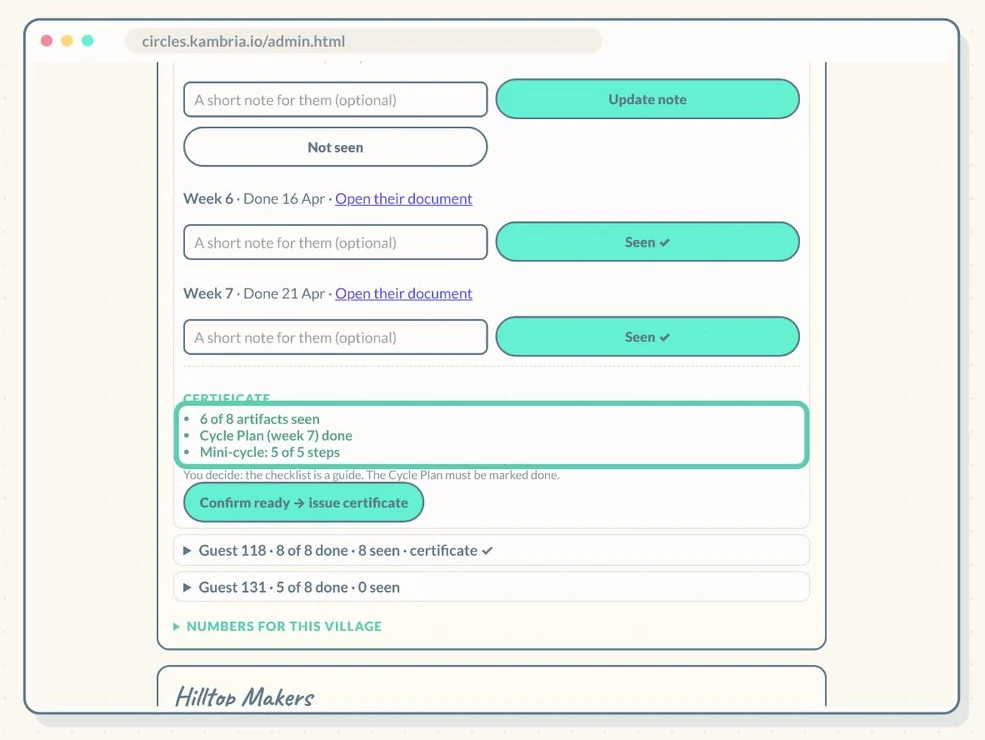
- Read the Certificate checklist: "… of 8 artifacts seen", "Cycle Plan (week 7) done" and "Mini-cycle: … of 5 steps".
- Decide if the learner is ready. The checklist is a guide; you decide.
- Tap Confirm ready → issue certificate and confirm.
- You see "Issued (date) · open the certificate". Tap it to check the certificate.
Good to know
- The button stays grey until the Cycle Plan (week 7) is marked done.
- The learner sees Your certificate is ready 🎉 on their village page and season page.
- The certificate shows the season, village, your display name, the 8 document names and the date. They are copied when you issue it and don't change later.
- One certificate per learner per season.
- Only admins can revoke a certificate issued by mistake. If you issue it again later, it keeps the same code.
- Learners can tick "I’d like to facilitate a later season". The admins see this and may ask you to reach them on Discord.
If something goes wrong
- "Certificates are issued in week 7."
- "The Cycle Plan (week 7) isn’t marked done yet." Ask the learner to tap Mark as done for week 7.
- "This person already has a certificate for this season."
- "This guest isn’t in the village." Reload the page; an admin may have moved them.
- "Only the village’s facilitator or an admin can issue certificates."