

For organisations & sponsors
Open · Sell your project's products
Updated 21 Nov 2026
This guide helps projects with a house on the street show up to 3 of their real products on their task board and impact report, each with a link to the project's own shop.
Before you start
- Your project has a house on the Open Circles street, and someone looks after it on the Lane desk (its lane). No house yet? See "The For organisations page" and Bring your project.
- Each product is sold in your project's own shop, on a page whose link starts with https://.
Steps
- Choose up to 3 real products of your project. For each one, write a name (2–40 characters), one short line (up to 120 characters, optional) and copy the link to the page of your shop where people buy it.
- Send them to your project's lane. If you are the lane, sign in to the Lane desk and follow "Add your project's products" under Open · Lanes.
- The lane opens Houses & tasks, finds your house, taps + Add a product under Buy from this project, fills in Product, One short line (optional) and Link to the project’s shop, and taps Add product.
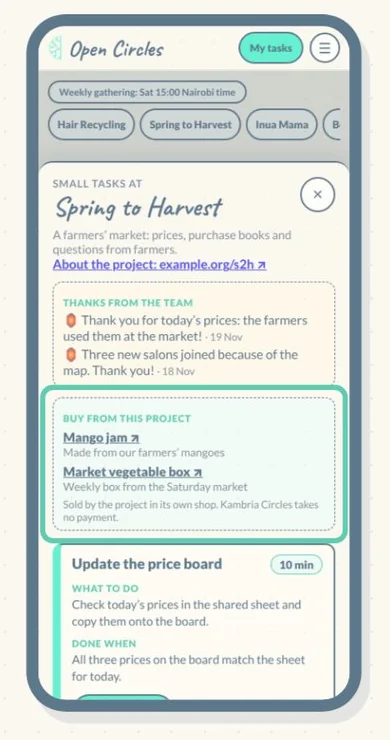
- Open your house on the street (circles.kambria.io, then tap your house). The board shows Buy from this project under Thanks from the team and above the tasks: each product is a link with its name and ↗, and the line "Sold by the project in its own shop. Kambria Circles takes no payment."
- Open your house's impact report (circles.kambria.io/impact.html?h=…). The same products show under Buy from this project.
- To see how often people open your products, ask your lane. On the Lane desk each product shows, for example, Mango jam · 3 clicks in 4 weeks, 10 in all.
- To change a product or take it away, tell your lane. They change it and tap Save product, or tap Remove product.
Good to know
- The website sells nothing: no prices, no orders, no payments. Each link opens your project's own shop in a new tab, and your shop handles the sale.
- A house lists up to 3 products. Names and lines can't have links, emails or phone numbers.
- Clicks are counted once a day per browser. Only the numbers are kept, never who clicked. Your lane and the Open Circles team (admins) see them.
- The Open Circles team can hide a product, for example when its link is broken. A hidden product is not on the board or in the report.
- If the site has other languages, your lane can add the product name and line in each language.
If something goes wrong
- A product doesn't show on the board: its link must start with https://. On the Lane desk, a product the Open Circles team hid shows (hidden by the Open Circles team). Write to circles@kambria.io.
- A house can list up to 3 products. Ask your lane to remove one first.
- No links, emails or phone numbers in the name or the line. The link goes only in Link to the project’s shop.