

Practice Circles · Practice Circles · Learners
Practice content in your language
Updated 20 Nov 2026
This guide helps learners read Practice Circles content in another language when the team has translated it.
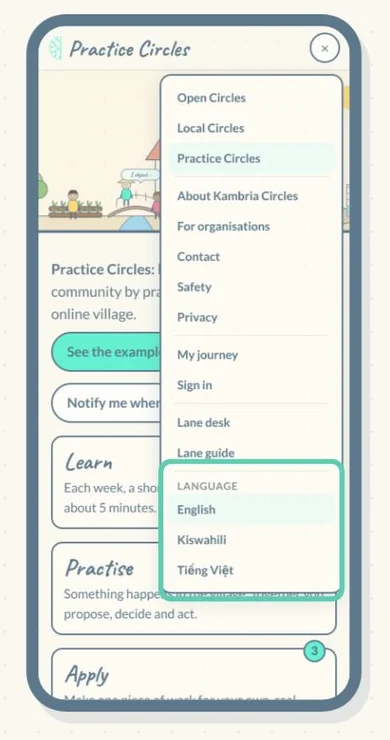
Before you start
- The team must have opened at least one language besides English. If not, the ☰ menu has no Language part.
Steps
- Open any Practice Circles page, for example the Practice Circles page.
- Open the ☰ menu.
- Under Language, tap your language. The page reloads.
- To go back, open the ☰ menu and tap English.
Good to know
- What can be translated: the 8 weeks (titles and lesson cards), the Example village (its name, proposal and lanes) and the 8 self-check questions.
- Buttons and menus stay in English for now. Anything not translated yet also shows in English.
- What people write in the village hall (proposals, objections, thanks) is never translated.
- The names of the documents on your certificate stay as they were when it was issued.
- On your first visit, the site picks your browser's language if it is one of the open languages. Your choice is kept on this browser.
- There is no machine translation: people on the team write every translation.
If something goes wrong
- Some text is still in English: it has not been translated yet. Tell your facilitator on Discord.
- Your language is not in the list: it is not open yet.