

Local Circles · Local · Neighbours
Join a ring of a challenge
Updated 20 Nov 2026
This guide helps neighbours ask to join one ring of a real local challenge.
Before you start
- You need an email account. Rings meet in real life, so joining needs one. Nobody on the site sees your email.
- You must be 18 or older.
- You can only join real challenges, not the Example one.
Steps
- Open the real challenge page and tap the stall of the ring you want.
- If you are not signed in with an email, tap Keep your lanterns with an email to join.
- On My account, under Keep your lanterns, type your email and tap Send me a link. If you already have an account, use Sign in → Send me a sign-in link.
- Open the email and tap the link. You come back to the challenge.
- New to the site? My account says “Add your email to join. You’ll be Guest …”. Type your email and tap Send me a link: you get your guest number at the same time, and the link brings you back to the challenge.
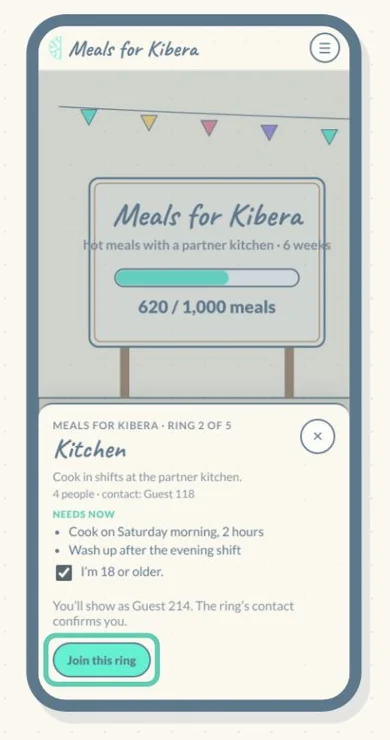
- Tick I’m 18 or older.
- Tap Join this ring. If the ring has nobody yet, the button says I’ll look after this.
- You see "You asked to join. The ring’s contact will confirm you soon."
- When the contact confirms you, the panel says "You’re in this ring. Thank you!" and the ring’s number of people goes up.
- Changed your mind? Tap Cancel my request (while waiting) or Leave this ring, then confirm Leave this ring?
Good to know
- One ring each per challenge. If you are already in another ring, you see "You’re in the Kitchen ring of this challenge. One ring each, so everyone can find their place."
- You show as your guest number (for example "Guest 214"). Only the ring’s contact and admins see who is waiting to join.
- Meet only in public places. Never send money to anyone you met here.
If something goes wrong
- "Rings are for adults (18 or older). Please tick the box." Tick the box and try again.
- "Keep your lanterns with an email first (My account), then join a ring." Sign in with your email first.
- "You are already in a ring of this challenge. Leave it first to change."
- "This is an example challenge. Count me in for your area instead."
- "You seem to be offline. Please try again when you’re back online."