

Local Circles · Local · Admins
Create a Local gathering
Updated 20 Nov 2026
This guide helps admins plan a gathering in a public place, and cancel it if needed.
Before you start
- The area exists in Areas.
- You have a public place: a café, library or community hall. Never a home.
Steps
- On the admin page, tap the Gatherings tab.
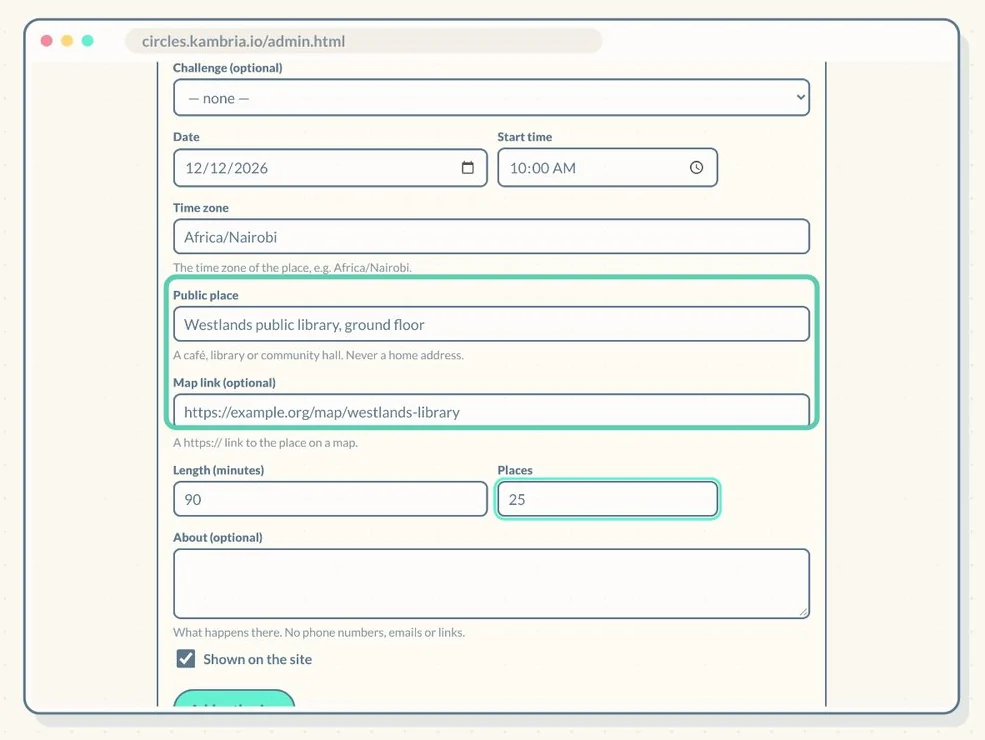
- Under Add a gathering, fill in:
- Title, for example "Nairobi coffee: meet the kitchen ring".
- Area, and Challenge (optional) (real challenges only).
- Date and Start time, then Time zone of the place on its own row (for example Africa/Nairobi).
- Public place: the name of the café, library or community hall.
- Map link (optional): an https:// link to the place on a map.
- Length (minutes) and Places (how many people can come).
- About (optional): what happens there.
- Keep Shown on the site ticked.
- Tap Add gathering. You see Added ✓.
- The gathering shows on circles.kambria.io/gather.html and on the Local Circles page. Tap Open the page ↗ to check it.
- Under Coming up, each gathering shows "N people are coming". Change and tap Save if needed.
- To cancel, untick Shown on the site and tap Save.
Good to know
- Always a public place, adults only. The page always shows the Meeting safely reminder.
- You see how many people are coming, never who. Nobody can see a list.
- The time shows in the place’s time zone, for example "(Nairobi time)".
- No home addresses, no GPS. Only the place’s name and an optional map link.
- The last 10 past gatherings are listed under Past.
If something goes wrong
- "The title needs 3 to 80 characters."
- "Pick an area (add areas in the Areas section first)."
- "Write the name of the public place."
- "Please leave out phone numbers, emails and links (the map link has its own box)."
- "Unknown time zone. Pick one from the list, e.g. Africa/Nairobi."
- "This date is in the past."
- "Length must be 15 to 480 minutes." / "Places must be 2 to 500."
- "The map link must start with https://"