

Open Circles · Guests & contributors
Join the DAO
Updated 20 Nov 2026
This guide helps contributors apply to join the Circles DAO, to help Kambria scale the impact of Kambria Circles.
Before you start
- You need at least one confirmed task (a lantern).
Steps
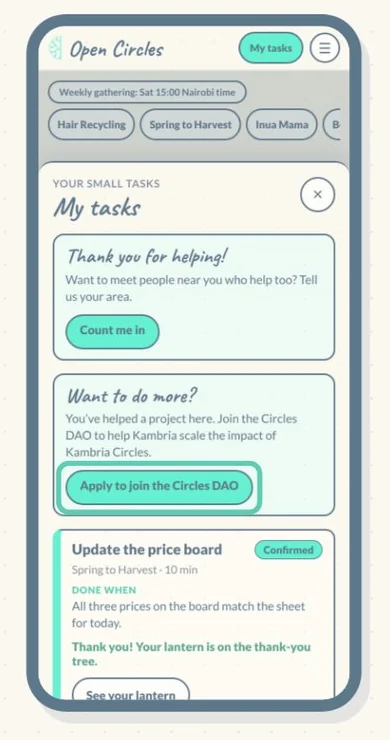
- Open My tasks. When one of your tasks is Confirmed, a box Want to do more? appears: "You’ve helped a project here. Join the Circles DAO to help Kambria scale the impact of Kambria Circles."
- Tap Apply to join the Circles DAO. The application form opens in a new tab.
- Fill in the form and send it.
- Open My journey: your step is now DAO applicant, with "You applied to join the Circles DAO. Keep helping on the street: every lantern counts."
Good to know
- Lane keepers also see Apply to join the Circles DAO on My journey, under Your next step.
- The button appears only while the Circles team has set the form link.
- After a confirmed task, My tasks may also show Thank you for helping! with Count me in, to meet people near you through Local Circles.
- Applying is free. There are no tokens, wallets or payments on the site.
If something goes wrong
- No Want to do more? box: you have no confirmed task yet, or the form link is not set at the moment. Try again later.
- The form doesn't open: allow pop-ups or new tabs for circles.kambria.io.