

Practice Circles · Practice Circles · Admins
Practice numbers and self-check averages
Updated 20 Nov 2026
This guide helps admins read how a Practice Circles season is doing.
Steps
- On the lane desk, tap Numbers and scroll to Practice Circles.
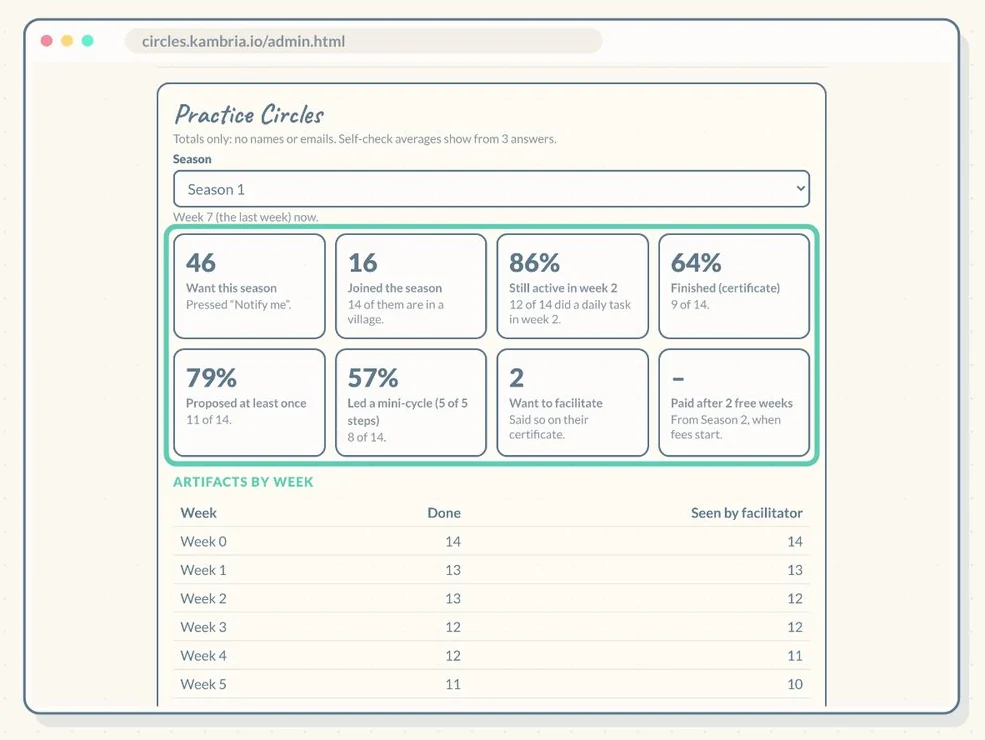
- Pick a Season. You see "Week … of 8 now." (in week 7: "Week 7 (the last week) now.") or "The season hasn’t started yet."
- Read the boxes: Want this season, Joined the season, Still active in week 2, Finished (certificate), Proposed at least once, Led a mini-cycle (5 of 5 steps), Want to facilitate and Paid after 2 free weeks.
- Read Artifacts by week: for each week, how many were done and how many seen by the facilitator.
- Read Villages: People, Helped (did a daily task this week), Artifacts (done this week) and Certs.
- Read Self-check: the average (1–5) of each question, before and after.
Good to know
- Totals only: no names, no emails, no single person's answers.
- Self-check averages show only from 3 answers. With fewer you see "fewer than 3" or "Fewer than 3 answers".
- "Still active in week 2" counts people who did at least one daily task in week 2. It shows from week 2.
- "Paid after 2 free weeks" stays "–": paid seasons start from Season 2, with payment outside the website. Its box says "From Season 2, when fees start."
- Facilitators see the same table for their own villages only.
If something goes wrong
- "Numbers can’t be loaded right now." Try again later.
- No Practice Circles card: no season has been added yet.