

Open Circles · Lanes (project leads)
Translate your house and tasks
Updated 20 Nov 2026
This guide helps lanes translate their house and tasks into the languages the Circles team has opened.
Before you start
- An admin must first add the language in Settings → Languages.
Steps
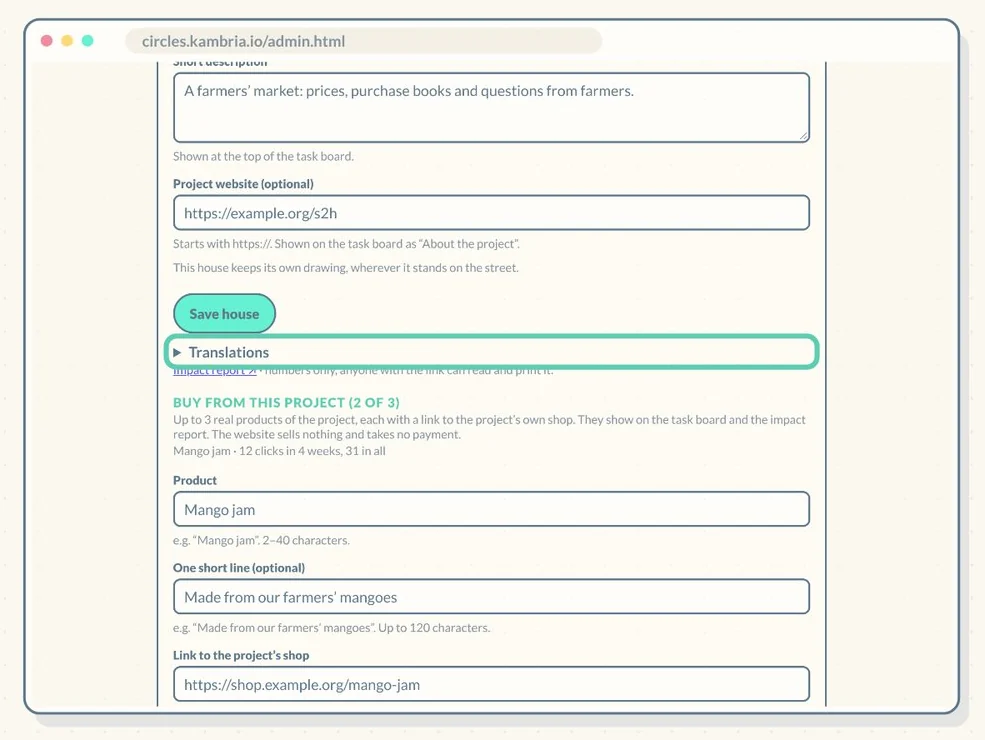
- In Houses & tasks, under your house form, tap Translations. The number in brackets shows how many languages are done.
- Choose the Language. A language marked (not open to guests yet) is only for trying translations first.
- Fill in House name · Kiswahili and Short description · Kiswahili (for example). Under each box you see the English to translate.
- Tap Save translation. You see Saved ✓.
- For a task, tap Edit next to it or the task's title, then tap Translations under its form.
- Translate Title, What to do and Done when. For a bigger task, translate Steps too: write the same number of lines as the English, one for each step.
- Tap Save translation.
- To check a language that isn't open yet, open the street with ?lang= and the code at the end, for example circles.kambria.io/?lang=sw.
Good to know
- Leave a box empty to show the English there.
- Translations are public, like the English.
- If you change the English later, the box says English changed after this translation: please check it.
- Write translations yourself or with a fluent speaker. The site has no machine translation.
- Only the projects' words are translated (names, descriptions, tasks). Buttons stay in English.
If something goes wrong
- No languages yet. An admin adds them in Settings → Languages.
- Steps: write 3 lines, one for each English line. Match the number of English steps.
- Title: up to 40 characters. (or the limit for that box)
- You don’t have permission to change this. You can only translate your own houses.