

For organisations & sponsors
Local · Fund a challenge by results
Updated 21 Nov 2026
This guide helps funders pay for a local challenge by its measured results: units the Circles team has checked against evidence, paid milestone by milestone.
Before you start
- You know which area or kind of challenge you would like to fund, and the result you would pay for, for example meals served or trees planted.
- You don't need an account on the website.
Steps
- Open circles.kambria.io/partners.html, or ☰ Menu → For organisations. Under Work with us, tap Become a sponsor. Say that you would like to pay for measured results, and for which challenge or area.
- Agree the terms with Kambria outside the website: the units committed, how results are checked, the milestones and what you pay for each milestone.
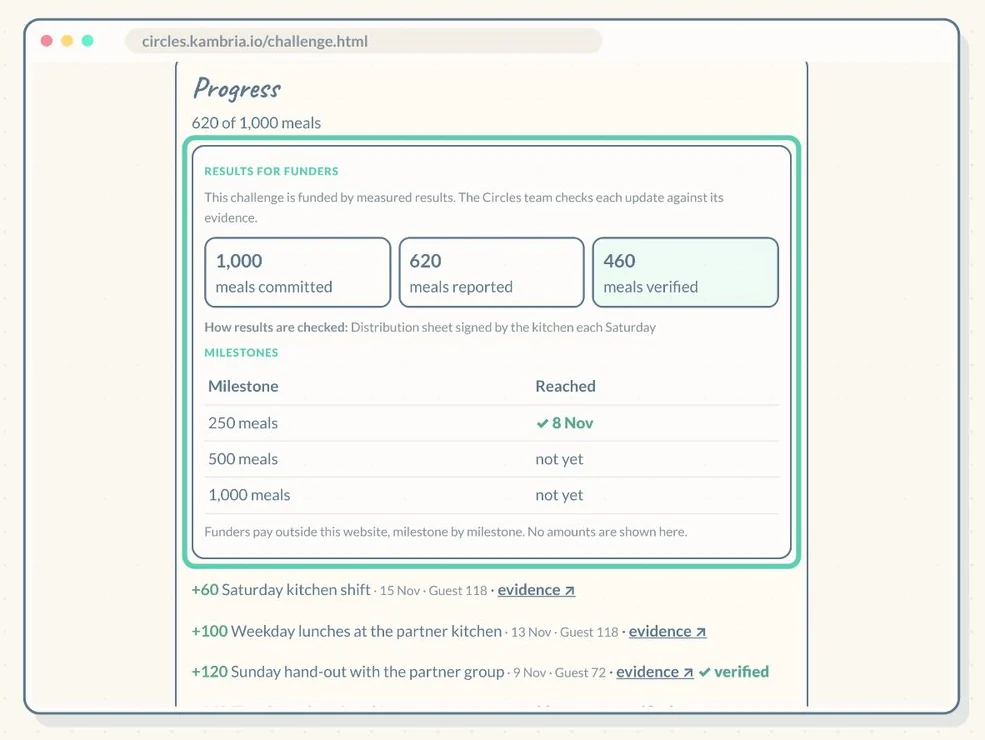
- A Circles admin sets up the agreement on the challenge. The challenge page then shows Results for funders under Progress.
- While the work goes on, ring contacts add progress with a link to the evidence, for example a photo or a distribution sheet in the project's own Drive. Each update shows evidence ↗.
- The Circles team checks each update against its evidence. Checked updates show ✓ verified.
- Open the challenge page at any time and read Results for funders: the units committed, reported and verified, How results are checked, and Milestones with the date each one was Reached, or not yet.
- Open the Results report (circles.kambria.io/report.html?c=…) to print it or save it as PDF. It has the same Results for funders part, and checked updates in Progress end with "✓ verified".
- When a milestone shows a date, pay the organisation doing the work, outside the website, as agreed.
Good to know
- "Funders pay outside this website, milestone by milestone. No amounts are shown here." The website never takes money and never shows prices or amounts.
- Only verified units count. A milestone is reached on the day the verified total first gets there. If a verification is undone and the total falls back, it shows not yet again.
- Evidence never includes photos or names of people who received help. The website stores only the link.
- The challenge page and the report show guest numbers only, never names or emails.
- You can also show as a sponsor on the challenge, with your name, logo and website (see "How sponsors show on a challenge").
If something goes wrong
- You don't see Results for funders: the agreement isn't set up on the challenge yet. Write to circles@kambria.io.
- An evidence ↗ link doesn't open: the project's file may not be shared. Tell the Circles team.
- "This challenge can’t be found." The link is wrong or the challenge is hidden.