

Open Circles · Lanes (project leads)
Share your impact report
Updated 20 Nov 2026
This guide helps lanes open and share the public impact report of their house, for sponsors and partners.
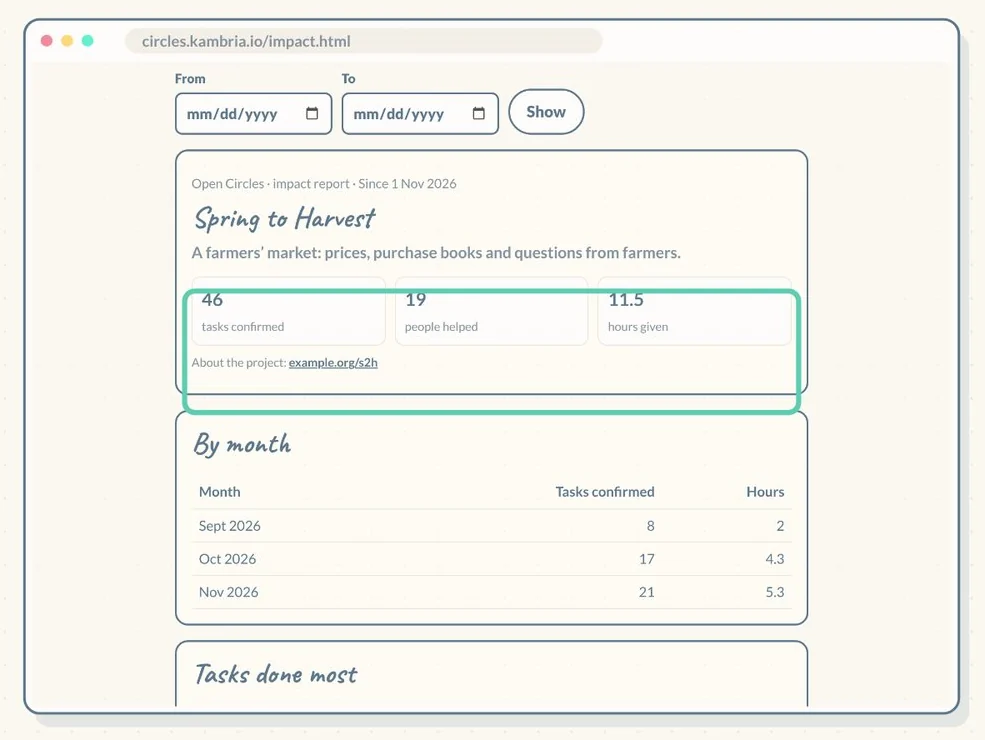
Steps
- In Houses & tasks, under your house, tap Impact report ↗. The report opens in a new tab.
- Read the numbers: tasks confirmed, people helped and hours given, then By month, Tasks done most and Thanks from the team.
- To show one period, choose From and To, then tap Show.
- Tap Copy link (it says Link copied ✓) and send the link to your sponsor or partner.
- Or tap Print / Save as PDF to make a PDF file.
Good to know
- The report shows numbers only: no names, no emails, no guest numbers (except in thank-yous your lane wrote). Hidden thank-yous don't show.
- Anyone with the link can read and print it.
- Hours are the time each task is planned to take, not measured time.
- Visit the house opens your house on the street.
If something goes wrong
- No tasks were confirmed in this period yet. Choose a longer period.
- This house can’t be found. The link is wrong: open it again from Houses & tasks.
- The report can’t be loaded right now. Please try again later.