

Practice Circles · Practice Circles · Learners
Join a season and a village
Updated 20 Nov 2026
This guide helps learners join a Practice Circles season and join or start a village.
Before you start
- A season must have sign-ups open (the Practice Circles page shows a Join button), or your team sent you a season link.
- An email address. We send you a sign-in link; there is no password.
- You must be 18 or older.
- To join a team's village: the 6-letter village code from your team.
Steps
- On the Practice Circles page, tap Join Season 1 (the button shows the season's name), or open the link your team sent.
- If you are not signed in, type your email under Your email and tap Send me a link. Open the email and tap the link: you come back to the season page.
- Tick I’m 18 or older. Pick Your time zone (optional), then tap Join the season.
- Choose one way in:
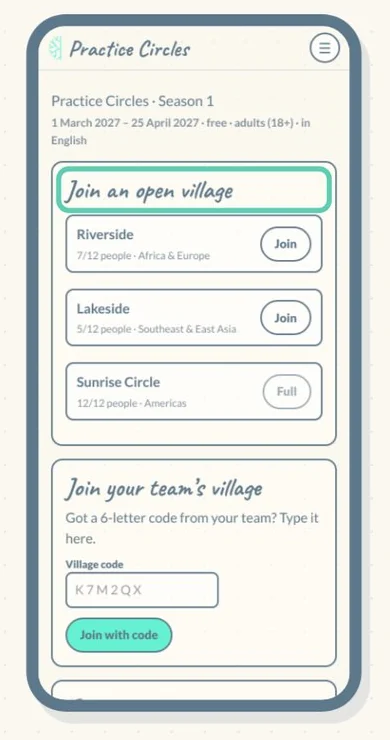
- Join an open village: pick a village from the list (name, people out of 12, time zone) and tap Join.
- Join your team’s village: type the code in Village code and tap Join with code.
- Start a village: type a Village name, choose Open or Team, and tap Start the village.
- Your village card shows the people as guest numbers; you are marked "(you)". In a Team village, tap Copy code and send the code to your team.
- Tap Open your village. When your facilitator is chosen, you also see "Facilitator: (name)" and Open the village channel on Discord.
- To leave before the season starts, tap Leave this village and confirm. Then you can join or start another village.
Good to know
- A village has 4 to 12 people. With fewer than 4 when the season starts, we match you with another village.
- Open: anyone in the season can join. Team: only people with your code can join.
- Your school, NGO or company may have its own village for your group. Your organisation gives you its code: use Join your team’s village. You pay no personal fee for it, and the village may have fewer than 12 places.
- One village per person per season.
- You can leave only before the season starts. After that, if you need another village, tell your facilitator: they ask the Practice team, who can move you.
- People see your guest number, never your email.
- An open village's hall (proposals, votes, objections) is public. A team village can keep its hall private.
- Signed out, the season page also lists Village halls you can read with Read the hall.
If something goes wrong
- "Practice Circles is for adults (18 and over). Please tick the box."
- "Give your village a name of 2–40 characters." or "Village names can’t have links, emails or phone numbers."
- "Codes have 6 letters and numbers, e.g. K7M2QX." or "We couldn’t find that village. Check the code."
- "This village already has 12 people." Pick another village.
- "Sign-ups are closed": the season isn’t taking new people. Leave your email with Notify me.
- "The season has started, so you can’t leave the village here. To move to another village, tell your facilitator: they ask the Practice team, who can move you."