

Practice Circles · Practice Circles · Learners
Thanks board and mini-cycles
Updated 20 Nov 2026
This guide helps learners thank others for unpaid work and record their week 7 mini-cycle.
Before you start
- The thanks board opens in week 4 (when the village fund opens).
- Mini-cycles open in week 7.
Steps
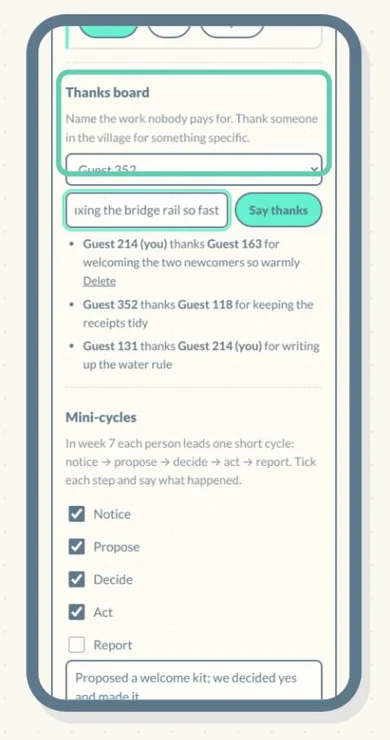
Thank someone:
- Scroll to Village hall and find Thanks board.
- In the first box, pick the guest you want to thank.
- In the second box, write what for, for example "for keeping the receipts tidy".
- Tap Say thanks. It appears as "Guest 12 thanks Guest 7 for …".
- To remove your own thanks, tap Delete and confirm.
Run your mini-cycle (week 7):
- Scroll to Mini-cycles in the hall.
- Tick each step you did: Notice, Propose, Decide, Act, Report.
- Write one or two sentences in "What happened?".
- Tap Save my mini-cycle. Others see "Guest … · 5 of 5 steps ✓" and your report.
- Come back and save again as you finish more steps.
Good to know
- Thank someone else in your village, not yourself. Up to 5 thanks a day.
- Thanks and mini-cycles are part of the hall: in an open village anyone can read them, with guest numbers.
- Your facilitator can hide a thanks.
- The admins use "5 of 5 steps" to count who led a mini-cycle, and your facilitator sees it before issuing your certificate.
If something goes wrong
- "Say what for in 3–120 characters." / "No links, emails or phone numbers."
- "Thank someone else in your village."
- "Up to 5 thanks a day. Come back tomorrow."
- "The thanks board opens in week 4." / "Mini-cycles start in week 7."
- "Keep the report under 300 characters, with no links, emails or phone numbers."