

Practice Circles · Practice Circles · Admins
Add sponsors and milestones to a village
Updated 21 Nov 2026
This guide helps admins add the sponsors of a Practice village and the milestones they back, and share a report link with the sponsors.
Before you start
- A company or ESG fund has agreed with Kambria to sponsor the milestones of one village. The agreement and Kambria's management fee (by invoice) are handled outside the website.
- You know the sponsor's name, and if they want, a link to their logo (a small picture) and their website. Both links start with https://.
- You are signed in on the lane desk as an admin.
Steps
- On the lane desk, tap Practice, scroll to the season and tap the village to open it.
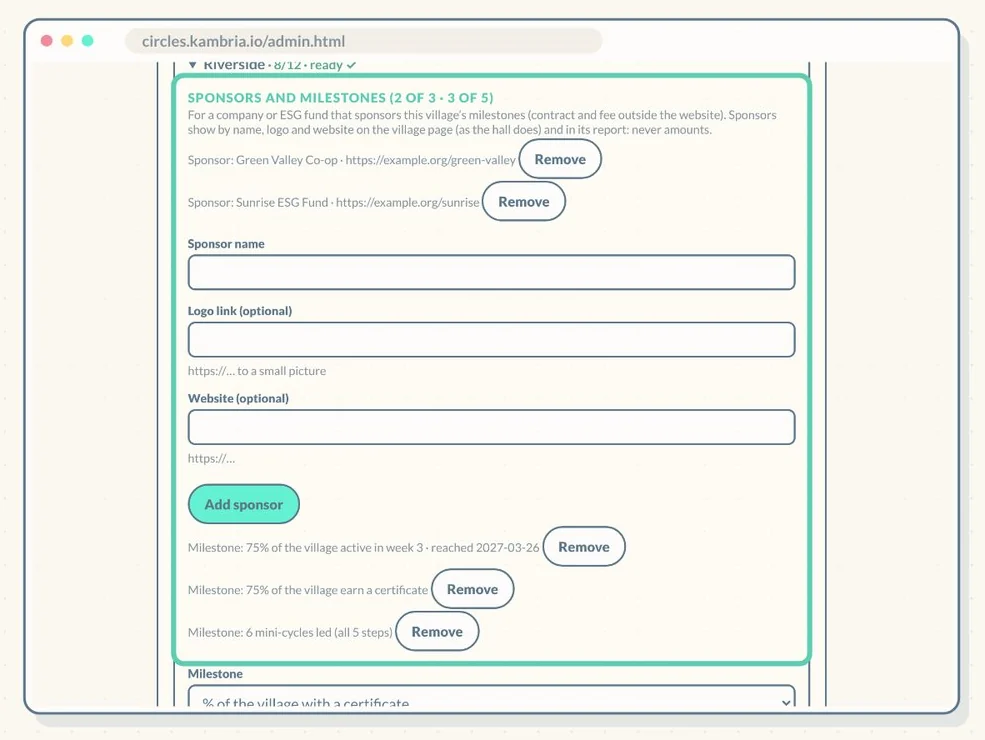
- Scroll to Sponsors and milestones (0 of 3 · 0 of 5).
- Fill in Sponsor name (2–60 characters), Logo link (optional) and Website (optional), then tap Add sponsor. The sponsor shows as, for example, "Sponsor: Green Valley Co-op · https://example.org/green-valley". Repeat for up to 3 sponsors.
- Under Milestone, choose what the sponsors back:
- % of the village with a certificate
- Mini-cycles led (all 5 steps)
- Proposals passed
- % of the village active in a week
- Artifacts done
- Type the Target (a number; percentages up to 100), for example 75. For % of the village active in a week, also type the Week (0–7, only for “active in a week”).
- Tap Add milestone. It shows as, for example, "Milestone: 75% of the village active in week 3". Repeat for up to 5 milestones.
- For a village that is not an organisation's village, tap Make a report link for the sponsors. The village now shows Report for sponsors with Ownership report ↗ and Copy link.
- Tap Copy link (it shows Copied ✓) and send the link to the sponsors, by email outside the website.
- To take a sponsor or a milestone away, tap Remove next to it and confirm.
Good to know
- The website sets the date a milestone is reached, from numbers it already counts. Nobody types it. You then see "· reached 2027-03-26" after the milestone. If the number falls back below the target, the date is cleared.
- Sponsors show by name, logo and website only, never amounts. They show in a Supported by box at the top of the village hall and in the village's report.
- In an open village, anyone can see the box. In a team village, only its members, its facilitator and admins see it, as with the hall.
- An organisation's village (see "Create a village for an organisation") already has a report link. Its report also shows the milestones once you add sponsors or milestones.
- If the report link was shared by mistake, tap New report link and confirm. The old link stops working.
- The website takes no payment. Sponsors pay Kambria outside the website, milestone by milestone.
If something goes wrong
- "Give the sponsor’s name (2–60 characters)."
- "Links must start with https:// (no spaces)."
- "Up to 3 sponsors per village." / "Up to 5 milestones per village."
- "A percentage from 1 to 100." / "A whole number from 1."
- "Choose the week (0–7)." You chose % of the village active in a week without a week.
- "Check the fields: name 2–60 characters, links starting with https://, percentages up to 100."
- "Only admins can change this." Sign in with your admin email.