

Open Circles · Admins
Add and remove lanes
Updated 20 Nov 2026
This guide helps admins give people access to the Lane desk for a house, and take it away.
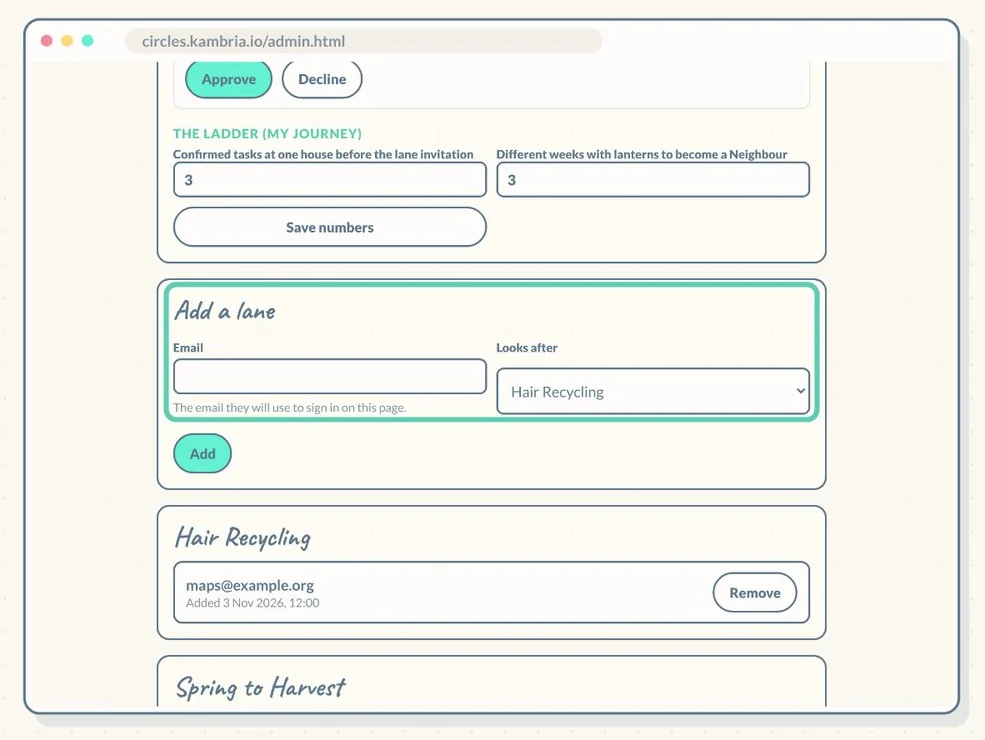
Steps
- Sign in to the Lane desk and open Lanes.
- Under Add a lane, type the person's Email: the email they will use to sign in.
- In Looks after, choose the house. Hidden houses show (hidden).
- Tap Add. You see Added … Send them this message: with a ready message.
- Tap Copy invite message (Copied ✓ Paste it into an email or chat.) and send it to the person. It contains the Lane desk link and the lane guide link.
- Below, each house has a card with its lanes. A house with nobody shows No lane yet.
- To remove someone, tap Remove next to their email and confirm ("Remove … from …? Their tasks and reviews stay.").
Good to know
- Only admins see this section. Lanes sign in with the email you add here.
- Removing a lane does not delete the house's tasks or reviews.
- The Admins card lists the admins. Only the site owner (badge owner) can add an admin, by choosing Admin, all houses in Looks after, and remove admins. Other admins see Only the site owner can remove admins. The owner's row shows Site owner: can’t be removed here.
- The same email can look after several houses: add it once per house.
- Your own row has the badge you.
If something goes wrong
- Please enter a valid email address. / Please check the email address.
- Pick a house.
- This email is already on the list for that house.
- You can’t make this change. You may be trying to add or remove an admin without being the site owner.
- The lane list can’t be loaded right now. Please try again later.