

For organisations & sponsors
Open · Task-matched sponsorship
Updated 21 Nov 2026
This guide helps companies match the confirmed tasks of a project on the Open Circles street, and follow them on its task board and in their own report.
Before you start
- You'd like to back a community project and pay only for real work: small tasks that helpers finished and the project's lane confirmed.
- You don't need an account on the website.
Steps
- Open the ☰ menu → For organisations, or go to circles.kambria.io/partners.html.
- Under Work with us, tap Become a sponsor. An email to circles@kambria.io (or a short form) opens. Say who you are and that you'd like to match a house's tasks.
- Agree with Kambria which house, how many tasks you match (for example 200), from which day and, if you like, until which day. Kambria charges a management fee and sends you invoices. All of this happens outside the website.
- A Circles admin adds you to the house: your name, and if you like your logo and website.
- Open the house on the street (circles.kambria.io, then tap the house). At the top of its task board you see your logo, "Each confirmed task here is matched by …" with your name (a link to your website), and a bar with, for example, "200 tasks matched · 46 done".
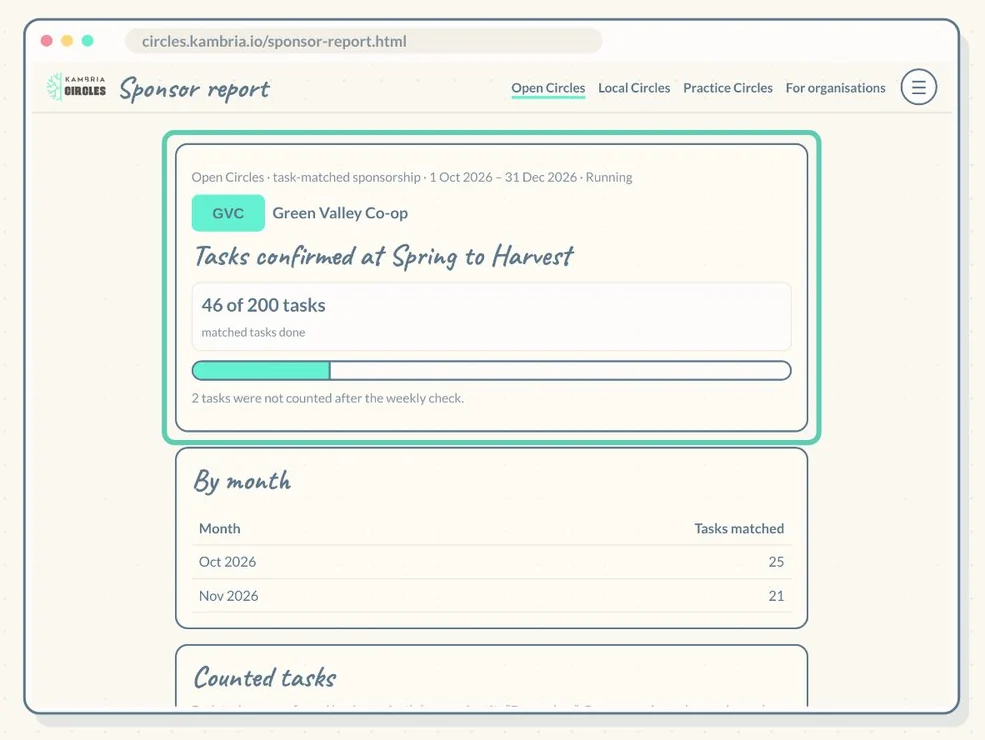
- Open the report link the Circles team sends you (circles.kambria.io/sponsor-report.html?k=…). No account is needed. The report shows your name, "Tasks confirmed at …" with the house, the days and the status, "46 of 200 tasks" with a bar, a By month table and Counted tasks: each task with its day, Guest number, title and Open the work ↗ (or "Written answer, checked by the lane").
- Tap Print / Save as PDF to keep a copy on A4. Visit the house opens the house on the street.
- Pay Kambria's invoices outside the website, as agreed. The money goes to the project.
- To keep going when your tasks run out, ask the Circles team to book your next match. It can start by itself when the current one is used up or ends. Each match has its own report link.
Good to know
- A task counts when the project's lane checked it against its "Done when" and confirmed it, inside your days, up to your number. Tasks count in the order they are confirmed, and each task counts for one sponsor only.
- Once a week a Circles admin opens a few counted tasks at random. A task that doesn't meet its "Done when" is not counted, and the next confirmed task takes its place. Your report says how many tasks were not counted after the weekly check.
- No amounts are shown anywhere: only your name, logo, website and the counts. The helpers who do the tasks are not paid.
- The house's impact report also shows "Tasks matched by …" with the counts per month.
- Your report never shows names, emails or written answers, only Guest numbers. Anyone with the link can read it: keep it inside your organisation. If it was shared by mistake, ask for a new link; the old one stops working.
- When all your tasks are done or the match ends, the box leaves the task board. Your report stays.
- The website takes no payment, and keeps nothing you write in the email or form.
If something goes wrong
- This report link doesn’t work. Ask the Kambria Circles team for a new one. The link is incomplete, or a new link was made. Write to circles@kambria.io.
- The report can’t be loaded right now. Please try again later.
- You don't see the box on the task board: your match has not started yet (the report says "Booked next"), or it has ended or all its tasks are done.
- The button doesn't open an email: your device may have no email app. Write to circles@kambria.io yourself.