

Open Circles · Guests & contributors
Walk the street and open a house
Updated 20 Nov 2026
This guide helps guests find their way along the Open Circles street and open a project's task board.
Steps
- Open circles.kambria.io on your phone or computer. While it loads you see Walking to the street…. On a slow connection you also see Slow connection, almost there….
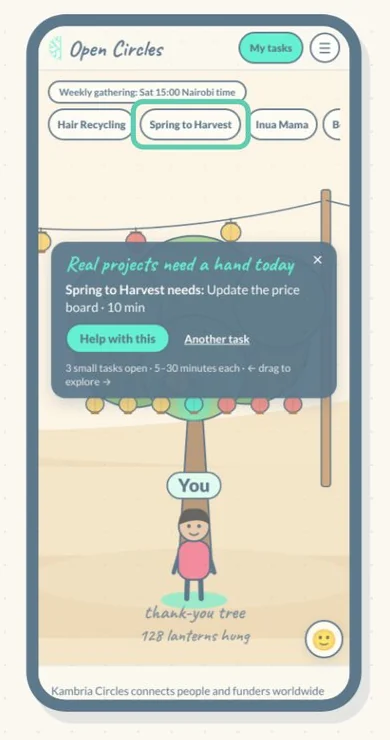
- Find yourself: your avatar has the label You and a mint glow, in the middle of the screen. At the top left you see how many people are here, for example 3 people here now. Other visitors show as Guest and a number.
- Read the card Real projects need a hand today. It shows one open task, for example "Hair Recycling needs: … · 15 min". Tap Help with this to open that house, or Another task to see a different one. Tap × to close the card.
- To move along the street, swipe left or right on a phone. On a computer, click and drag, or use the mouse wheel.
- To jump to a house, tap its name in the row of house buttons at the top left. The street walks there and the button turns mint.
- Tap the house itself to open its task board (Small tasks at + the house name).
- Read the board: the project's short description, About the project: … ↗ (the project's website), Thanks from the team, and each task with its time, What to do and Done when.
- Some boards also show Buy from this project: up to 3 real products of the project. Each link opens the project's own shop in a new tab. The website itself sells nothing and takes no payment. The site counts how often each product is opened, never who opened it.
- Some boards also show "Each confirmed task here is matched by …" with a sponsor's name and a bar such as "200 tasks matched · 46 done". It means a sponsor supports the project for each task its lane confirms. The money goes to the project; helpers are not paid.
- To close the board, tap ×, tap outside it, or press Esc on a computer.
Good to know
- Each board shows up to 5 open tasks. Each small task takes 5–30 minutes.
- You can share a link that opens a house directly, for example circles.kambria.io/#house/hair-recycling.
- Scroll down below the street to see the footer: Contact, About, Safety and Privacy.
- The ☰ menu at the top opens all pages: My journey, My account (or Sign in), For organisations and more. The menu is grouped like these docs: Take part, Organisations & sponsors, Your account, For lanes, facilitators & admins, and About.
If something goes wrong
- Tasks can’t be loaded right now. Please try again later. Check your connection and open the house again in a few minutes.
- No open tasks right now. Check back soon. The project has no task open today. Try another house.
- The board opened when you only wanted to swipe? Lift your finger only after you stop moving; a drag does not open a house.