

Local Circles · Local · Ring contacts
Add progress to a challenge
Updated 20 Nov 2026
This guide helps ring contacts add what their ring did to the challenge’s progress.
Before you start
- You are signed in as the contact of any ring of this challenge (or you are an admin).
- The challenge is a real one (not Example) and has not reached its goal yet.
- If the challenge shows Results for funders, it pays for measured results: have a link to the evidence ready, a photo or a sheet in your project's own Drive (it starts with https://).
Steps
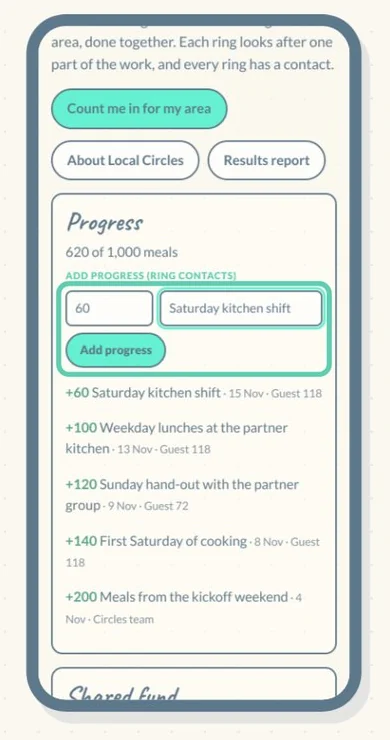
- Open the real challenge page and scroll to Progress.
- Under Add progress (ring contacts), type how many in the first box (for example 60 in "+ meals").
- In What happened? (e.g. Saturday kitchen shift), write a short note.
- If the challenge pays for results, paste the link in Link to the evidence (https://…). Use a photo or a sheet in your project’s Drive, never photos or names of people who received help.
- Tap Add progress.
- The total and the log update: "+60 Saturday kitchen shift · 6 Dec · Guest 118".
- On a challenge that pays for results, your update also shows evidence ↗. When the Circles team has checked it, it shows ✓ verified.
- Made a mistake? Add a negative number (for example -10) with a note like "Correction: counted twice".
- When the total reaches the goal, everyone sees We did it! and What next? opens. The form disappears.
Good to know
- Everyone can read the progress log, with the contact’s guest number. Admin entries show "Circles team".
- Notes are 3–140 characters, with no links, emails or phone numbers. Never write names of people who received help.
- The number must be a whole number, not 0, and the total can’t go past the goal.
- The progress also appears on the results report for sponsors.
- On a challenge that pays for results, only updates the Circles team has verified count towards the milestones funders pay for. A correction (a negative number) needs no evidence.
If something goes wrong
- "Add a number between 1 and the goal (or a negative number to correct a mistake)." The box is empty, 0 or not a whole number. Type for example 60, or -10 to correct a mistake.
- "Say what happened in 3–140 characters, with no links, emails or phone numbers."
- "Add a number between 1 and the goal (or a negative number to correct a mistake)." The number is too big.
- "Only a ring’s contact or an admin can add progress." You don’t see the form or get this message: check you are signed in with the contact’s email.
- "Progress is only for real challenges." This is the Example challenge.
- "This challenge pays for results: add a link to the evidence (https://…)." Paste the link in Link to the evidence.
- "The evidence link must start with https:// (no spaces)." Check the link in Link to the evidence.