

Practice Circles · Practice Circles · Facilitators
Numbers for your villages
Updated 20 Nov 2026
This guide helps facilitators see how their villages are doing.
Steps
- On the lane desk, open My villages.
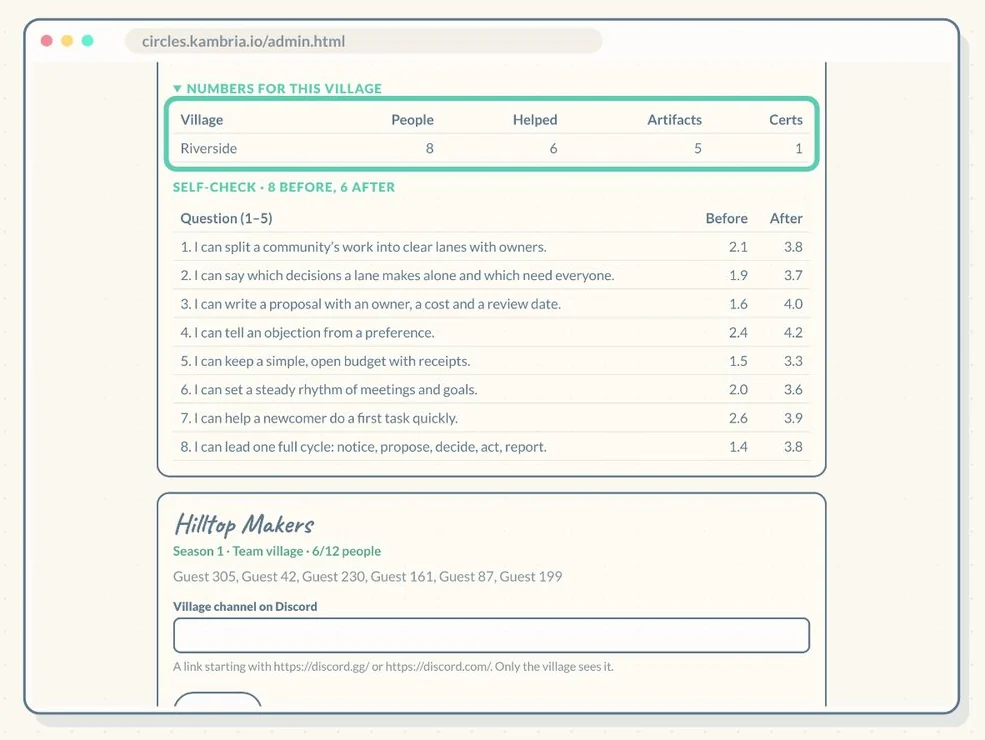
- Under a village, tap Numbers for this village.
- Read the table: People, Helped (people who did a daily task this week), Artifacts (documents marked done this week) and Certs (certificates).
- Read Self-check · … before, … after: the average answer (1–5) for each of the 8 questions, before and after.
Good to know
- You see only the villages you lead. The admins see the whole season.
- These are totals only: no names, no emails, no single person's answers.
- Self-check averages show only when 3 or more people answered. Otherwise you see "fewer than 3".
- Use the numbers to notice who may need a nudge on Discord, for example when few people helped this week.
If something goes wrong
- "Only the village’s facilitator or an admin can see these numbers."
- The numbers don't load: try again later, then tell the admins.