

Open Circles · Guests & contributors
Take a task
Updated 20 Nov 2026
This guide helps guests choose a small task on a house's board and add it to My tasks.
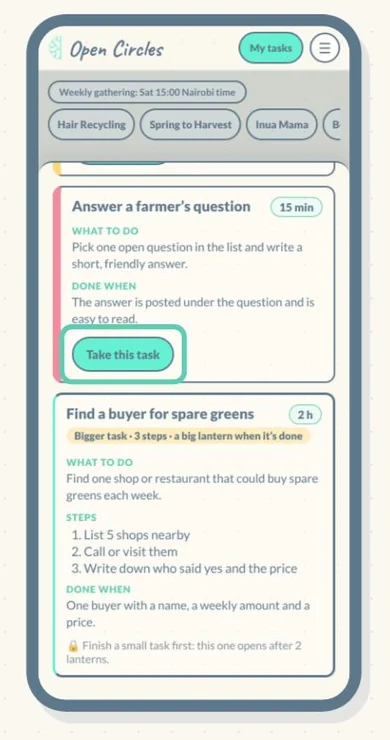
Before you start
- Tasks are for adults only (18 or older).
- Read What to do and Done when first. "Done when" is how the project will check your work.
Steps
- Open a house on the street (see "Walk the street and open a house").
- Choose a task that you can finish now. The time is shown next to the title, for example 15 min.
- Tap Take this task. The button shows Taking….
- The first time, a short "are you a person?" check may appear inside the task card. Tick it if asked.
- The button changes to In My tasks ✓, and the button at the top of the street shows My tasks (1).
- Do the task, then send your work from My tasks (see "Send your work in My tasks").
Good to know
- You can have at most 2 tasks to finish at a time: tasks you took (Taken) and work the lane sent back (Returned). Work you sent that is Waiting for the lane doesn’t count, so you can take a new task while you wait. You can drop a task that is Taken or Returned.
- Your guest number and tasks are saved in this browser. If you clear your browser data or change phone, you start as a new guest, unless you keep your lanterns with an email first.
- Tap In My tasks ✓ on the board to open My tasks.
- Some bigger tasks open only after you finish a small task (see "Bigger tasks with steps").
- Never share personal details (phone numbers, addresses, photos of people) in your work.
If something goes wrong
- You already have 2 tasks to finish (taken or returned). Send or drop one first. Work waiting for the lane doesn’t count. Open My tasks and send your work, or tap Drop task on one of them.
- This task is already in My tasks. You took it earlier: open My tasks.
- This task is no longer open. The project closed it. Choose another task.
- This bigger task opens after you finish a small task. Pick a small one first.
- We couldn’t start your guest account. Please try again in a moment. or We couldn’t check that you’re a person. Please try again. Wait a moment and tap again. An ad blocker can block the check: try turning it off for this site.
- Taking tasks isn’t available right now. The site can't reach its database. Try again later.
- You seem to be offline… Check your connection and tap again.