

Practice Circles · Practice Circles · Admins
Create a village for an organisation
Updated 21 Nov 2026
This guide helps admins create a private Practice village for an organisation (a school, an NGO or a company team) and give it its invite code and ownership report.
Before you start
- The organisation got in touch with Send your team and has agreed the contract and invoice with Kambria, outside the website.
- The season is on the Practice tab, and you are signed in on the lane desk as an admin.
Steps
- On the lane desk, tap Practice and scroll to the season's card, below its villages.
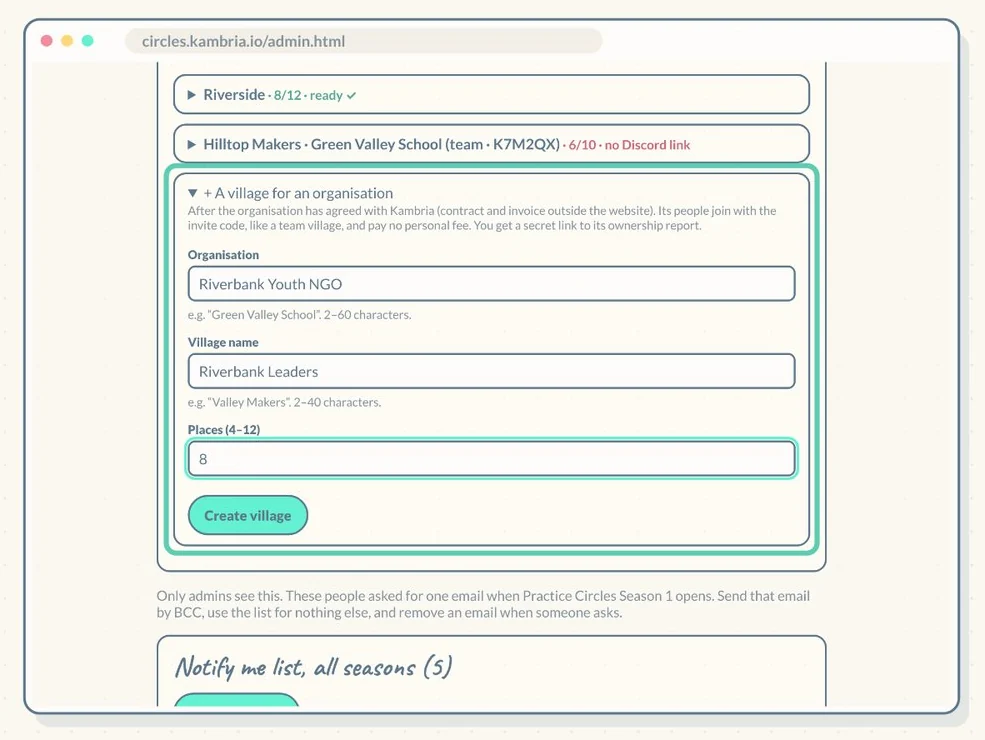
- Tap + A village for an organisation.
- Fill in Organisation (2–60 characters, for example "Green Valley School"), Village name (2–40 characters, for example "Valley Makers") and Places (4–12): the number of people agreed with the organisation.
- Tap Create village. The village appears in the list with the organisation's name and code, for example Valley Makers · Green Valley School (team · K7M2QX) and 0/10.
- Tap the village to open it. Under Organisation · Green Valley School you see Ownership report ↗, Copy link and "Invite code for its people: K7M2QX · places: 10".
- Tap Copy link (it shows Copied ✓). Send the report link and the invite code to the organisation's lead, by email outside the website.
- Choose the village's Facilitator and add its Discord link, as for any village (see "Season villages and moving people").
- To change the number of places, type it in Places (4–12) and tap Save.
- When the facilitator has written the Note for the report, read it, tick Show the note in the report and tap Save. You can also change the note yourself and tap Save note.
- If the report link was shared by mistake, tap New report link and confirm. The old link stops working; send the new one to the organisation.
Good to know
- The organisation's people join with the code like any team village: an email account, 18 or older, and no personal fee.
- The village takes at most its number of places. You can't set fewer places than the people already in it.
- Only admins and the village's facilitator see the report link and the note. Members of the village never see them.
- The report shows counts only, never names, emails or answers. Self-check averages show only from 3 answers.
- When the facilitator changes the note, it is hidden from the report until you tick Show the note in the report again.
- The website keeps no contact details of the organisation.
If something goes wrong
- "Places must be a whole number from 4 to 12."
- "Use 2–60 characters for the organisation, with no links, emails or phone numbers."
- "Use 2–40 characters for the village name, with no links, emails or phone numbers."
- "4 to 12 places, and not fewer than the people already in the village."
- "Only admins create villages for organisations."
- The organisation says This report link doesn’t work. Ask the Kambria Circles team for a new one. Send them the link that shows now under Ownership report ↗.