

For organisations & sponsors
Open · Read an impact report
Updated 20 Nov 2026
This guide helps sponsors and partners read, filter and print the impact report of a house on the Open Circles street.
Steps
- Open the link the project shared with you. It looks like circles.kambria.io/impact.html?h=…. You can also find one on the For organisations page.
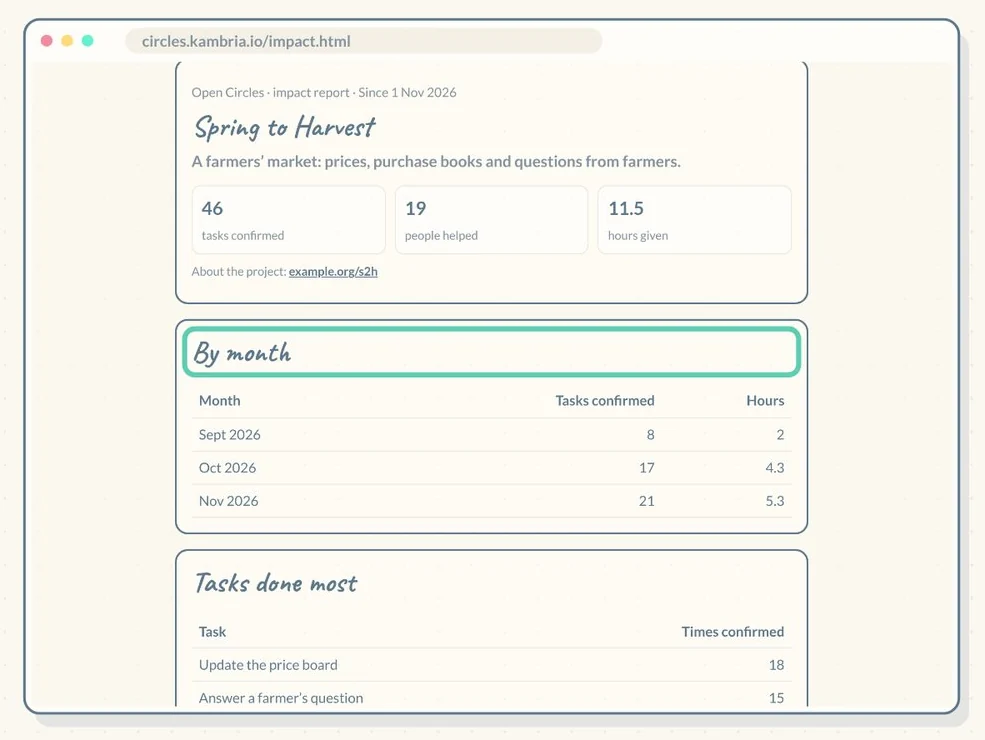
- At the top you see Open Circles · impact report, the period (for example Since 3 Jan 2027), the house name and its description.
- Read the three big numbers: tasks confirmed, people helped and hours given.
- Read By month (tasks confirmed and hours per month), Tasks done most and Thanks from the team.
- To see one period, choose From and To, then tap Show.
- Tap Print / Save as PDF to print it or save it as a file. The printed page leaves out the menu, buttons and date boxes.
- Tap Copy link to share it, or Visit the house to see the house on the street.
Good to know
- A task is counted when the project's lane checked it against its "Done when" and confirmed it.
- "Hours given" adds up the time each task is planned to take; it is not measured time.
- The report shows numbers only: no names, emails or guest numbers, except inside thank-yous the project wrote.
- Made on … at the bottom shows the day the report was made.
- Anyone with the link can read it. No account is needed.
- The report may also list the project's products under Buy from this project, each a link to the project's own shop. The website itself sells nothing.
- If a sponsor matches the house's tasks, the report also shows Tasks matched by … with how many matched tasks are done and a table per month. Counts only, never amounts.
If something goes wrong
- Which house? Open this page from the link a project shared with you. The link is incomplete.
- This house can’t be found. Ask the project for the link again.
- No tasks were confirmed in this period yet. Choose a longer period.
- The report can’t be loaded right now. Please try again later.