

Practice Circles · Practice Circles · Admins
Practice seasons and sign-ups
Updated 20 Nov 2026
This guide helps admins add a season, open sign-ups and set the village hall numbers.
Steps
- Sign in on the lane desk and tap Practice.
- In the Seasons card, under Add a season, fill in Season name (e.g. "Season 1") and Link name (small letters, numbers and "-", e.g. season-1).
- Set Starts on and Ends on.
- Leave Sign-ups open unticked until you are ready. Tick Hidden (only people with the link can join) for a team trial.
- Tap Add season. You see "Added ✓" and a card for the new season.
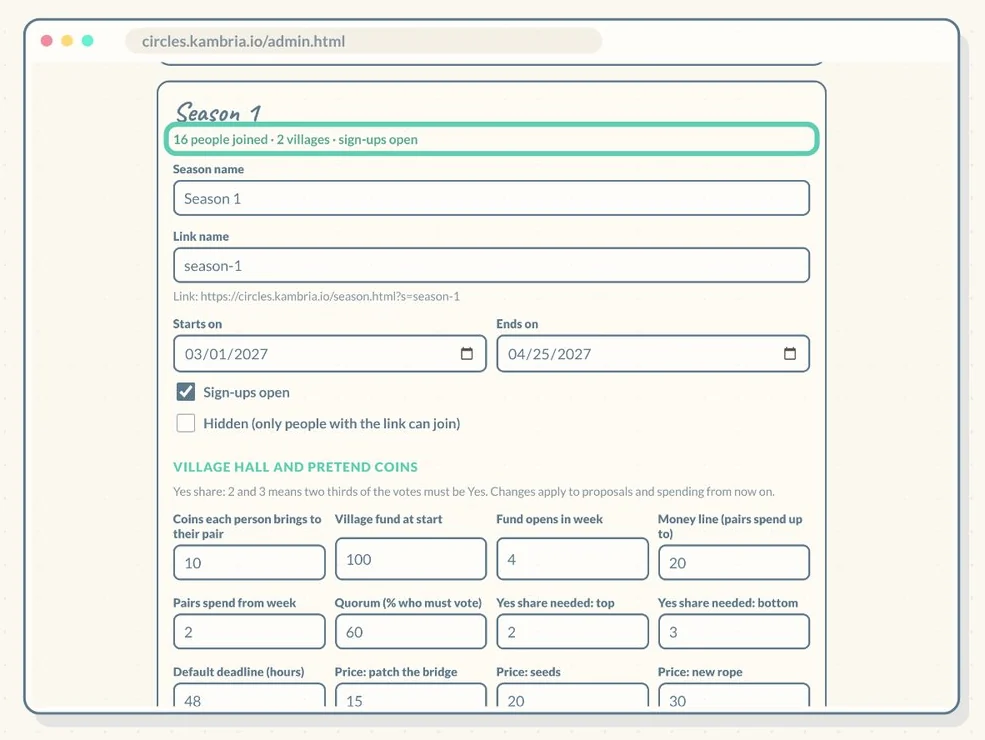
- In the season's card, check the line "… people joined · … villages · sign-ups closed". The hint under Link name shows the season link to share.
- When ready, tick Sign-ups open and tap Save. The Practice Circles page now shows Join (season name) instead of Notify me.
- Under Village hall and pretend coins, change the numbers if needed and tap Save.
Good to know
| Number | Starts as |
|---|---|
| Coins each person brings to their pair | 10 |
| Village fund at start | 100 |
| Fund opens in week | 4 |
| Money line (pairs spend up to) | 20 |
| Pairs spend from week | 2 |
| Quorum (% who must vote) | 60 |
| Yes share needed: top / bottom | 2 / 3 |
| Default deadline (hours) | 48 |
| Prices: patch the bridge / seeds / new rope | 15 / 20 / 30 |
- Only a season with Sign-ups open and not hidden shows on the Practice Circles page. A hidden season is joined only with its link.
- The weeks run by themselves from Starts on: 7 days a week, UTC time. Before that date people can join, leave and look around.
- Changes to the numbers apply to proposals and spending from now on.
- The link name can't be changed later.
- Untick Sign-ups open to stop new people joining; people already in keep their village.
If something goes wrong
- "Give the season a name (max 60 characters)."
- "Link name: small letters, numbers and “-” only (e.g. season-1)." / "That link name is already used."
- "The end date is before the start date."
- "Set a start date before opening sign-ups on the Practice page."
- "“Quorum (% who must vote)” must be a whole number from 1 to 100." (the same for each number)
- "The Yes share can’t be more than 1 (top ≤ bottom)."