

Local Circles · Local · Neighbours
Suggest and +1 the next challenge
Updated 20 Nov 2026
This guide helps neighbours suggest the next challenge for their area, or support ideas from others, once a goal is reached.
Before you start
- The challenge must have reached its goal. Ideas only open then.
- You need an email account (keep your lanterns with an email on My account).
Steps
- Open the real challenge page and scroll to Progress. When the goal is reached you see "We did it!" with flying lanterns.
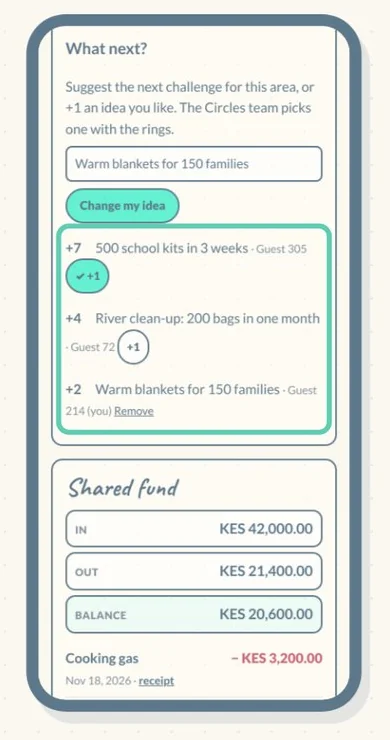
- Under What next?, read: "Suggest the next challenge for this area, or +1 an idea you like. The Circles team picks one with the rings."
- Type your idea in the box (for example "500 school kits in 3 weeks").
- Tap Suggest. Your idea appears in the list with your guest number and "(you)".
- To change your idea, edit the text and tap Change my idea. You have one idea per challenge.
- To support another idea, tap +1 next to it. It turns into ✓ +1. Tap again to take your +1 back.
- To delete your idea, tap Remove and confirm Remove this idea?
Good to know
- Ideas are 5–80 characters, with no links, emails or phone numbers.
- You cannot +1 your own idea.
- Everyone sees the ideas, the guest numbers and the +1 counts. Nobody sees your email.
- Admins can remove any idea.
- The Circles team chooses the next challenge together with the rings; the most +1s is a signal, not an automatic vote.
If something goes wrong
- "Describe the next challenge in 5–80 characters, with no links, emails or phone numbers." Shorten or clean your text.
- "Keep your lanterns with an email first (My account)." Sign in with your email first.
- "Ideas open once the goal is reached."
- "You can’t +1 your own idea."