

Practice Circles · Practice Circles · Admins
Manage Practice facilitators
Updated 20 Nov 2026
This guide helps admins add and remove facilitators and find graduates who want to facilitate.
Steps
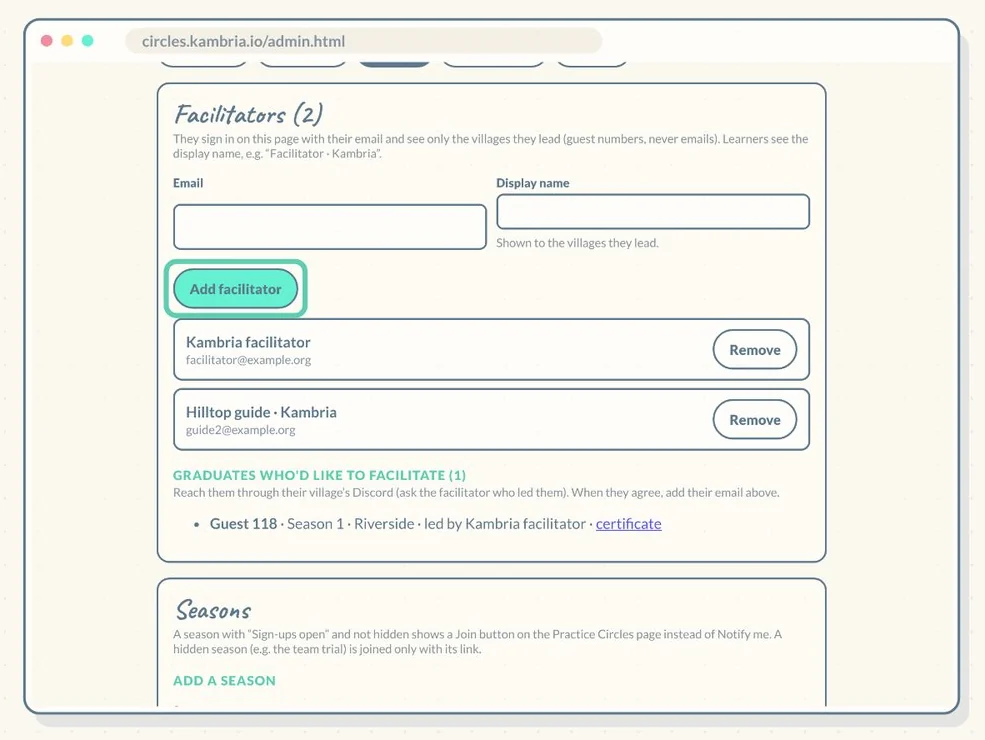
- On the lane desk, tap Practice and find the Facilitators card.
- Type the facilitator's Email (they sign in on the lane desk with it) and a Display name (e.g. "Facilitator · Kambria").
- Tap Add facilitator. They appear in the list.
- Choose them for a village in the season's villages (see "Season villages and moving people").
- Tell them to sign in on the lane desk and on My account with the same email.
- To remove someone, tap Remove and confirm. Their villages have no facilitator until you choose another.
- Read Graduates who'd like to facilitate: each line shows the guest number, season, village, who led them and a link to their certificate.
Good to know
- Learners see only the display name, and only for their own village. Facilitators never see learners' emails.
- Each village has one facilitator; a facilitator can lead several villages.
- A facilitator sees only My villages on the lane desk (unless they also hold a lane).
- No contact details are collected from graduates. Reach them through their village's Discord (ask the facilitator who led them). When they agree, add their email here.
If something goes wrong
- "Please enter a valid email address."
- "Use a display name of 2–40 characters, e.g. “Facilitator · Kambria”."
- "No links, emails or phone numbers in the display name."
- "This email is already a facilitator."